
🚨 Why This Blog Matters
Filing your taxes online in 2026 is faster, safer, and more rewarding than ever. This guide walks you through the complete online tax process—so you can avoid costly mistakes, speed up your refund, and confidently take advantage of every deduction and credit you deserve.
🧠 What You’ll Learn Here
Discover how to file taxes online step by step, including what documents you need, how to choose the best tax filing software, and how to enter W-2, 1099, and investment income. You’ll also learn the difference between free vs. paid filing, how to claim the biggest deductions and credits, and how to track your IRS refund like a pro.
🎯 Who Should Read This
Perfect for first-time filers, freelancers, gig workers, and small business owners who want a clear and complete online tax guide for 2026. Whether you’re filing a simple return or managing multiple income sources, this blog makes the process stress-free and mistake-proof.
Tax filing online is now the preferred choice for millions of taxpayers due to its convenience, accuracy, and speed. While it may seem like a straightforward process, using reliable online tax software ensures a more confident approach and maximizes refund potential. From an easy form supported by the IRS for free to tax software loaded with features, there’s a common thread here: anyone can file online.
In this guide, we will teach you how to do your taxes online so you meet all of the deadlines while maximizing your eligibility deductions and credits. Follow these steps to feel empowered and file in the comfort of your home, whether you are doing this for the first time or just need a brush-up.
Key Takeaways
- Small businesses need tax software that supports deductions, payroll integration, and multi-entity filing.
- Features like automated expense tracking, real-time tax calculations, and e-filing streamline tax management.
- Cloud-based solutions offer secure storage, accessibility, and compliance updates to meet changing tax laws.
- Pricing varies based on features, with some offering tiered plans for different business sizes and needs.
- Choosing software with strong customer support, audit assistance, and reporting tools helps businesses manage taxes efficiently and avoid penalties.
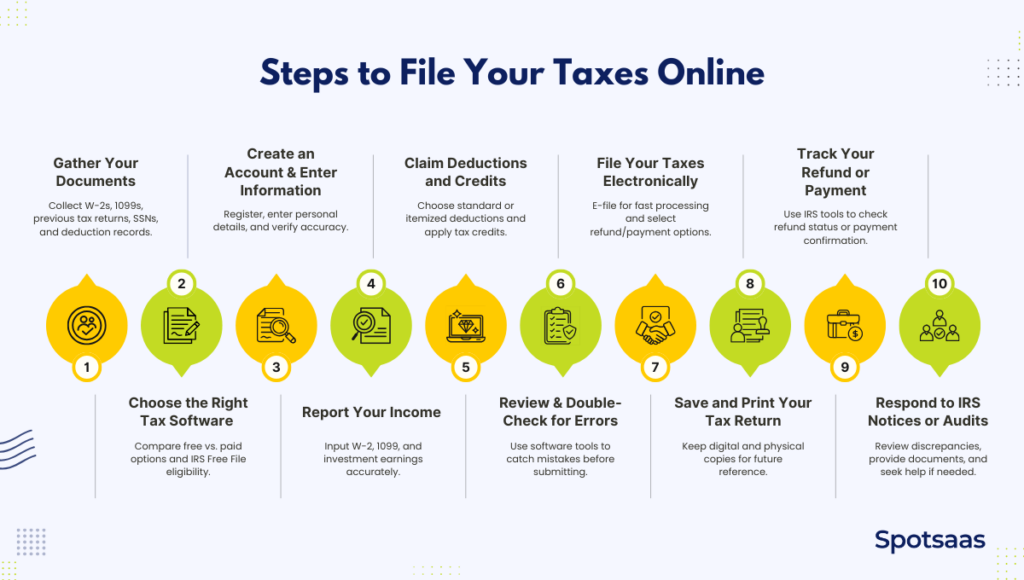
Step 1: Gather All Tax Documents Before Filing Online
Before filing your taxes online, having all the necessary documents ready will make the process smoother and help prevent errors. Missing or incorrect information can lead to delays, IRS notices, or penalties. Below is a checklist of essential documents you may need.
W-2s from Employers: What You Need to Know
If you are employed, your employer will provide a W-2 form by the end of January. This document reports your total earnings, federal and state tax withholdings, Social Security and Medicare contributions, and other relevant information. If you worked for multiple employers, make sure you have a W-2 from each one.
1099 Forms Explained: Freelance, Gig, and Miscellaneous Income
For independent contractors, freelancers or gig workers, 1099 forms replace W-2s. There are different types of 1099 forms, including:
- 1099-NEC – Reports non-employee compensation for freelancers and self-employed individuals.
- 1099-MISC – Covers miscellaneous income such as rent, prizes, or legal settlements.
- 1099-K – Issued by third-party payment processors (PayPal, Venmo, or Stripe) if transactions exceed $600 in a year.
If you earned income but did not receive a 1099 form, you must still report it. Keep track of payments from clients or platforms like Upwork, Fiverr, or Uber.
Mortgage Interest (Form 1098): How It Affects Your Taxes
If you own a home and pay a mortgage, your lender will issue a Form 1098 detailing the mortgage interest you paid during the year. Mortgage interest is often tax-deductible, helping reduce your taxable income if you itemize deductions.
Reporting Investment Income (1099 Forms): What to Include
If you earned interest, dividends, or capital gains from investments, you’ll receive specific 1099 forms from your bank or brokerage:
- 1099-INT – Reports interest earned from savings accounts, bonds, or certificates of deposit (CDs).
- 1099-DIV – Covers dividends and capital gains distributions from stocks or mutual funds.
- 1099-B – Reports gains or losses from selling stocks, bonds, or other securities.
- 1099-R – If you took distributions from a retirement account like a 401(k) or IRA.
Even if you didn’t receive a form, you must report any investment earnings on your tax return.
Use Last Year’s Tax Return to Ensure Accuracy
Having last year’s tax return on hand can help you:
- Ensure consistency in reporting income and deductions.
- Carry forward any unused deductions or credits.
- Verify prior tax payments or estimated tax credits.
Most tax software allows you to import previous returns, making the process faster and more accurate.
Collect SSNs or TINs for Your Dependents
If you are claiming dependents (children or qualifying relatives), you’ll need their Social Security numbers (SSNs) or Taxpayer Identification Numbers (TINs) to claim tax benefits such as:
- Child Tax Credit
- Earned Income Tax Credit (EITC)
- Dependent Care Credit
Ensure that all dependent information is accurate to avoid rejections or delays.
Common Tax Deductions & Credits You Might Qualify For
Certain expenses may qualify for deductions or credits, reducing your taxable income and potential tax bill. Common ones include:
- Education Expenses (Form 1098-T) – Tuition and related fees can qualify for credits like the American Opportunity Credit or Lifetime Learning Credit.
- Student Loan Interest (Form 1098-E) – If you paid interest on student loans, you might qualify for a deduction of up to $2,500.
- Medical and Dental Expenses – You can deduct qualified medical expenses exceeding 7.5% of your adjusted gross income (AGI) if you itemize deductions.
- Charitable Donations – Cash and non-cash contributions to eligible charities may be deductible.
Final Document Check Before Filing Your Taxes
Before proceeding, ensure you have digital or paper copies of all necessary documents. If any form is missing, check with your employer, bank, or financial institution to request a copy. Keeping organized records will make tax filing smoother and help you maximize potential deductions and credits.
Step 2: Choose the Best Tax Filing Software for Your Needs
Selecting the right tax filing software can make the process smoother, help maximize deductions, and ensure accuracy. With multiple options available, it’s important to compare platforms, understand free vs. paid options, and check for eligibility for IRS Free File.
Top Online Tax Filing Software Compared (2026)
Several tax software options cater to different needs, from simple tax returns to complex filings with multiple income sources. Here’s a quick comparison of some top platforms:
Comparison of Popular Online Tax Filing Platforms
| Software | Best For | Key Features | Pricing |
|---|---|---|---|
| TurboTax | Beginners & complex tax returns | Step-by-step guidance, expert help, seamless import of W-2s & 1099s | Free for basic, paid plans start at ~$59 |
| H&R Block | Those who want online + in-person support | In-person assistance, audit support, multiple filing options | Free for basic, paid plans start at ~$35 |
| TaxAct | Budget-friendly filers | Affordable paid plans, strong accuracy guarantee, simple UI | Free for basic, paid plans start at ~$25 |
| FreeTaxUSA | Cost-conscious filers | Free federal filing, low-cost state filing, includes most deductions | Free for federal, state filing ~$14.99 |
| Cash App Taxes | 100% free filing | No hidden costs, covers most tax situations, simple interface | Completely free |
Each platform offers different levels of support and pricing. If you have a straightforward tax return, a free version may be sufficient, but if you have deductions, investments, or self-employment income, a paid version with expert assistance may be worth considering.
Free vs Paid Tax Software: Which Should You Choose?
The best option depends on your income, deductions, and tax situation.
Free Filing
Many platforms offer free filing for simple tax returns that include:
- W-2 income
- Standard deduction
- Earned Income Tax Credit (EITC)
- Child Tax Credit (CTC)
If you don’t have investments, freelance income, or complex deductions, a free option may work for you.
Paid Filing
Paid plans are better for those with:
- Self-employment or freelance income (1099-NEC, 1099-K)
- Itemized deductions (mortgage interest, medical expenses, etc.)
- Investment or rental property income
- Multiple state tax returns
Many paid versions offer features like live tax professional assistance, audit support, and automatic deduction optimization.
IRS Free File Program (2025): Who’s Eligible?
The IRS Free File program allows eligible taxpayers to file their federal taxes for free through participating software providers. To qualify:
- Your adjusted gross income (AGI) must be $73,000 or less for the tax year.
- The program offers access to brand-name tax software with step-by-step guidance.
Eligible taxpayers can visit the IRS Free File website to find an approved provider.
Step 3: Create Your Tax Filing Account & Enter Personal Info
Once you’ve chosen a tax filing platform, the next step is to set up an account and enter your personal details accurately to avoid IRS delays.
How to Set Up Your Tax Filing Software Account
To register, you’ll need:
- Email address for verification
- Username & password for security
- Multi-factor authentication (MFA) for added protection
Many platforms allow you to import previous tax returns, saving time and reducing errors.
Entering What Personal Details You’ll Need for Filing Details
Full Name & Social Security Number (SSN)
- Must match your Social Security card to prevent IRS rejection
- If filing jointly, include your spouse’s SSN
Filing Status Selection
Your filing status affects your tax rates and credits. Most tax software helps determine the best option:
- Single – Unmarried individuals
- Married Filing Jointly – Combined income for couples
- Married Filing Separately – Separate returns for spouses
- Head of Household – Unmarried, supporting a dependent
- Qualifying Widow(er) – Recent widows with dependents
Address & Contact Information
- Use your current mailing address for IRS correspondence
- Update with the IRS if you’ve moved recently to avoid refund delays
Double-Check Details to Avoid Tax Filing Errors
- Double-check SSN to match IRS records
- Verify filing status to maximize benefits
- Use the correct address to prevent refund delays
- Ensure name consistency to avoid rejections
Step 4: Accurately Report All Income Sources
Accurately reporting income is crucial for tax filing. Whether you’re an employee or freelancer or have multiple income sources, tax software simplifies the process.
How to Report W-2 and 1099 Income in Tax Software
W-2 Income (For Employees)
Employers provide a W-2 form detailing:
- Total wages earned
- Tax withholdings (federal, state, Social Security)
- Retirement contributions (401k, etc.)
1099 Income (For Freelancers & Gig Workers)
Self-employed individuals must report 1099 forms:
- 1099-NEC – Contract/freelance work
- 1099-MISC – Rent, royalties, or miscellaneous income
- 1099-K – Payment processors (PayPal, Venmo) for earnings over $600
Self-employed workers must also pay Social Security & Medicare taxes, which tax software calculates automatically.
What to Do If You Have Multiple Income Source
Side Gigs & Freelance Work
Report all earnings, even without a 1099. Tax software helps track deductible expenses (mileage, supplies).
Investment Income
- 1099-INT – Interest from savings accounts/bonds
- 1099-DIV – Dividends from stocks/mutual funds
- 1099-B – Capital gains/losses from stock sales
Since brokers report income to the IRS, ensure accuracy.
Rental Property Income
Report rental income and deduct expenses like mortgage interest, maintenance, and depreciation (Schedule E).
What to Do If You’re Missing Tax Forms
- Check email/online portals for digital copies
- Contact the issuer for corrections or duplicates
- Use year-end statements to estimate income
- File an extension if needed for corrections
Step 5: Maximize Deductions and Tax Credits
Deductions and credits help lower your taxable income and reduce the amount of tax owed. Choosing the right software can maximize your refund.
Standard vs. Itemized Deductions: Which Saves You More?
Taxpayers can either take the standard deduction or itemize deductions:
- Standard Deduction (2023): $13,850 (Single), $27,700 (Married Filing Jointly), $20,800 (Head of Household).
- Itemized Deductions: Best for those with high mortgage interest, medical expenses (over 7.5% of AGI), state/local taxes (SALT cap: $10,000), or charitable donations.
Most taxpayers take the standard deduction for simplicity, but tax software compares both options for the best outcome.
Most Overlooked Tax Deductions You Should Know
- Mortgage Interest – Deduct interest on loans up to $750,000 (Form 1098).
- Medical Expenses – Deduct out-of-pocket costs exceeding 7.5% of AGI.
- Student Loan Interest – Deduct up to $2,500 (Form 1098-E).
Top Tax Credits That Reduce Your Tax Bill
- Earned Income Tax Credit (EITC) – Refundable credit for low-to-moderate-income workers (up to $7,430).
- Child Tax Credit (CTC) – $2,000 per child (up to $1,600 refundable).
Step 6: Review Your Return for Costly Mistakes
Before submitting your tax return, carefully reviewing your information can prevent IRS rejections, refund delays, or penalties. Most tax software provides built-in tools to help catch mistakes, but it’s essential to verify key details yourself.
How to Check Personal Info & Income for Accuracy
- Double-check Social Security numbers (SSNs) for yourself, your spouse, and your dependents.
- Verify name spellings match IRS records.
- Confirm income entries match your W-2s, 1099s, and other tax documents.
- Ensure bank details are correct for direct deposit refunds.
Let Your Tax Software Catch Common Mistakes
- Most platforms scan for missing or inconsistent data before submission.
- Software alerts can identify incorrect calculations, unreported income, or missing deductions.
- Take advantage of the final review sections, which highlight potential issues.
Common Tax Filing Mistakes & How to Avoid Them
- Incorrect SSNs – A single-digit error can cause an IRS rejection.
- Missed signatures – If required, electronically sign before submitting.
- Mismatched filing status – Selecting the wrong status can affect deductions and credits.
- Unreported income – The IRS receives copies of W-2s and 1099s, so failing to report them can trigger audits.
Step 7: E-File Your Taxes for Faster Refunds
E-filing is the fastest and most secure way to submit your tax return. Most tax software providers work directly with the IRS e-file system, ensuring accuracy, quick processing, and confirmation of receipt.
Why E-Filing is the Smartest Way to File in 2026
- Tax software prepares and submits your return electronically to the IRS and state tax agencies.
- The IRS typically processes e-filed returns within 21 days, compared to 6-8 weeks for paper returns.
- Built-in error detection reduces mistakes and rejections.
- Faster refund processing when selecting direct deposit instead of paper checks.
How to Pay Taxes Owed via IRS Direct Pay or Plans
If you owe taxes, the IRS offers several payment options:
IRS Direct Pay
- Secure online payment directly from a checking or savings account.
- No additional fees, and confirmation is provided immediately.
Debit/Credit Card Payments
- Payments can be made through IRS-approved processors, though processing fees apply.
IRS Payment Plans
- Short-Term Plan – Pay the balance within 180 days, no setup fee.
- Long-Term Installment Agreement – Monthly payments for larger balances; a setup fee may apply.
Track Your IRS Refund Status Online
If expecting a refund, check its status using:
- “Where’s My Refund?” tool on the IRS website or IRS2Go app.
- Updates are available 24 hours after e-filing (or 4 weeks after mailing a paper return).
- Refunds are typically issued within 21 days for direct deposit or longer for mailed checks.
Step 8: Save & Print Your Tax Return for Future Use
Keeping a copy of your tax return is essential for future reference, proof of filing, and potential audits. Both digital and physical copies ensure easy access when needed.
Why Keeping a Tax Return Copy Matters
Keeping a copy of your tax return is essential for financial and legal purposes. It serves as proof of income when applying for loans, mortgages, or financial aid. Having previous tax records also makes future tax filings easier, especially when carrying over deductions, credits, or losses.
If the IRS audits your return or if corrections are needed, a saved copy ensures you have all necessary documentation readily available.
How Long to Keep Your Tax Records (IRS Guidelines)
The IRS advises keeping tax records for at least three years, but in some cases, longer retention is necessary:
- 3 years – General guideline for most taxpayers.
- 6 years – If you have underreported income of more than 25%,
- 7 years – If claiming a loss from bad debt or worthless securities.
- Indefinitely – If you did not file a return or filed a fraudulent one.
Smart Ways to Store Digital & Paper Tax Returns
- Digital Copies – Store securely on a cloud service, encrypted USB, or external hard drive.
- Physical Copies – Keep in a fireproof, safe, or organized filing system.
Final Step
Ensure your records are stored securely and accessible when needed. Keeping organized tax documents saves time and reduces stress in the case of audits or financial verifications.
Step 9: Monitor Your Refund or IRS Payment
Monitor your refund or tax payment to stay informed about your tax status.
How to Use the IRS Refund Tracker Tool
Check your refund status via the IRS website or IRS2Go app using:
- SSN/ITIN
- Filing status
- Exact refund amount
The tool updates daily and shows three stages: Return Received, Refund Approved, and Refund Sent.
IRS Refund Timeline: When Will You Get Paid?
- Direct Deposit: Within 21 days of e-filing
- Paper Check: 6–8 weeks due to mailing delays
Errors, missing details, or IRS reviews may cause delays.
How to Handle IRS Notices or Audits
- Review the notice for discrepancies.
- Compare with your return and follow instructions.
- Respond promptly to avoid penalties.
- For audits, gather supporting documents or seek professional help.
Regularly check your refund status and address any IRS notices quickly to prevent issues.
Final Thoughts: File Taxes Online With Confidence in 2026
Filing taxes online is a streamlined and efficient process when done correctly. By gathering necessary documents, choosing the right tax software, accurately reporting income, claiming deductions and credits, and reviewing your return for errors, you can maximize refunds and minimize potential issues.
E-filing offers faster processing, and tracking tools like “Where’s My Refund?” ensure you stay updated on your return status. Keeping copies of your tax return for future reference and responding promptly to IRS notices will help maintain financial compliance. With careful preparation and attention to detail, you can complete your tax filing with confidence and ease.
FAQs About Filing Taxes Online in 2026
How long does it take to get my tax refund?
E-filed returns with direct deposit are usually processed within 21 days, while paper checks take 6–8 weeks.
Should I take the standard deduction or itemize?
Choose the standard deduction if it’s higher than your total itemized deductions; tax software can help compare both.
What if I make a mistake on my tax return?
You can file an amended return (Form 1040-X) if you need to correct errors after submission.
How do I pay taxes if I owe money?
Use IRS Direct Pay, debit/credit card, or set up an installment plan to avoid penalties.
How long should I keep my tax records?
Keep tax records for at least three years, but longer if you have specific deductions or potential audits.
