
Managing teams and projects can be hard for businesses, so many turn to productivity tools like Hubstaff for help. Hubstaff gives employers a clear view of employee activity, tracks the time people spend on their work, and handles routine administrative processes that would otherwise eat into the day. With a broad set of features and a simple, easy-to-learn interface, it aims to keep teams performing well and the whole organization running in an orderly way.
Hubstaff Reviews: Overview
Hubstaff is time-tracking software used by businesses across many different industries. Its features help employers gain insight into working hours, raise productivity, and cut down on the administrative tasks that pile up. Employers can track how their team members use their time, understand project progress, and manage their workforce more efficiently across the board.
The core of Hubstaff is its time-tracking functionality. It lets employers see how much work time their workforce spends on different projects and tasks, so they always know where the hours are going. Thanks to a simple interface, automated tools, and a stated commitment to transparency and privacy, Hubstaff lets employers concentrate on growing their companies while keeping the management of their workforce accurate and efficient day to day.
3 Key Features of Hubstaff
Time Tracking
One of Hubstaff’s main features is its time-tracking solution, which lets businesses monitor and manage their workforce’s productivity in every kind of work setup: remote, hybrid, and in-office. Hubstaff makes the often tedious job of logging work hours easier, which helps employers assign resources well, run payroll without the usual friction, and keep overall day-to-day operations efficient.
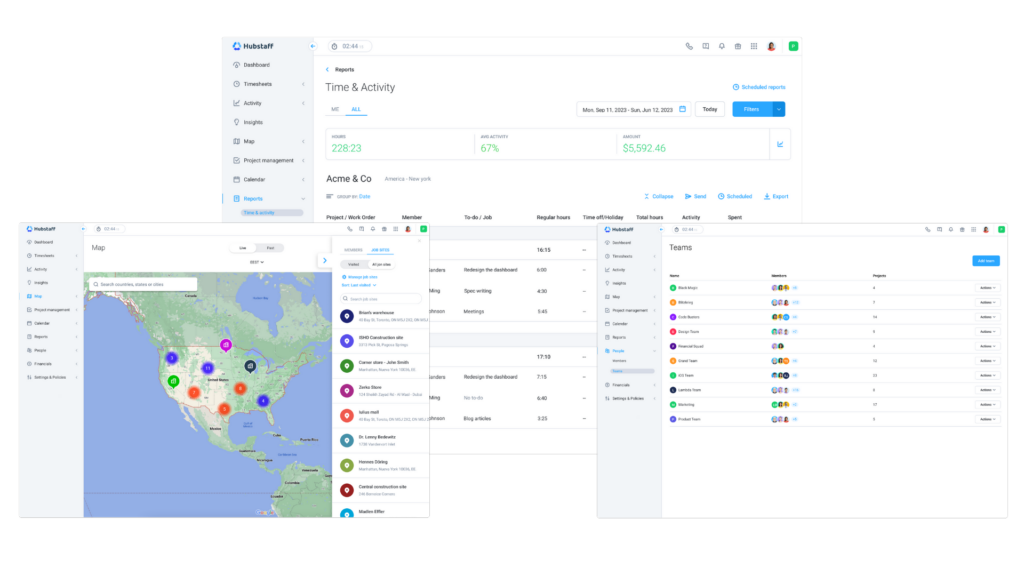
With its mobile, desktop, and web-based apps, employees can clock in and out from any device, which keeps time tracking accurate and reliable no matter their location or operating system. By removing manual methods like paper timesheets, Hubstaff frees employees to stay focused on their core tasks. That same automation extends to payroll, where billable hours can be calculated and paid through platforms like PayPal, Payoneer, Wise, and Bitwage.
Hubstaff keeps time tracking accurate through automated productivity monitoring. By matching time entries directly to invoicing, it lowers the chance of mistakes, which means every minute worked is properly recorded and paid for. That accuracy makes it easier for employers and employees to trust each other, and it cuts down on administrative work, saving both time and resources.
Hubstaff also treats transparency and autonomy as important, giving users full access to their tracked data, including clock-in and clock-out times and activity logs. The same applies to privacy settings: users can manage and delete their data as needed, without worrying about unauthorized access or misuse.
Beyond tracking time in real time, Hubstaff produces detailed reports that give a clear read on workforce performance and project efficiency. More than 17 different reports are available, which lets employers spot trends, find ways to improve, and make informed decisions about how they allocate resources and set project budgets. On top of that, Hubstaff includes advanced features like GPS tracking and geofenced time clocks. These are especially useful for mobile and field service teams, since they track time and location accurately, keep operations organized, and support compliance with work policies and regulations.
Productivity Management
By providing tools for open monitoring and clear analytics, Hubstaff helps employers raise productivity levels and support business results. It offers customizable screenshots and employee monitoring so employers can gain real-time insight into what their team is doing. Alongside tracking activity levels and giving out achievement badges, it monitors keyboard and mouse actions to gauge productivity and recognize outstanding performance. The optional screenshot feature gives a periodic look at each employee’s workload, which keeps monitoring clear without being intrusive.
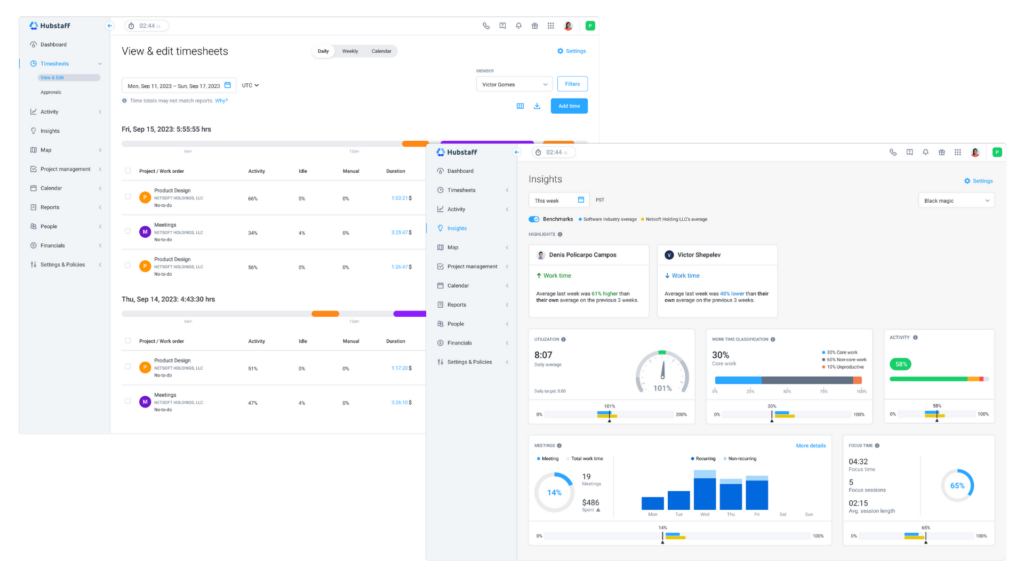
Hubstaff’s productivity tracker assesses employee performance based on mouse and keyboard use. It assigns productivity rates so employers can focus on the measures that matter most rather than getting lost in raw data. Through built-in time tracking and analytics, employers can see performance data such as activity, app, and URL usage, earnings, and hours worked. Handing out achievement badges adds motivation as well, marking productivity milestones and building a culture of appreciation across the team.
By combining time tracking with productivity monitoring, Hubstaff helps employers improve employee performance and tidy up their workflow processes. With features like activity rates, budgets, reports, and Hubstaff Tasks, managing projects and resources becomes far more efficient. On top of that, the productivity reporting tools add detailed insight into employee behavior, which helps employers find areas to improve and apply specific strategies to lift productivity.
Hubstaff’s virtual achievement badges reward efficient work and lift team spirits. By recognizing and celebrating what employees accomplish, employers can build a positive work culture and encourage continued productivity and strong performance. Its feature to remove idle time lets users delete idle time easily, which keeps time tracking and payroll management accurate. By getting rid of idle-time differences, employers can keep their time-tracking processes transparent, pay employees correctly, and allocate resources fairly.
Workforce Management
Hubstaff’s workforce management feature gives employers a comprehensive set of tools to make administrative tasks easier, improve efficiency, and manage teams well. By automating work like payroll, invoicing, scheduling, and expense tracking, it lets employers focus on strategic growth while the day-to-day operations keep running smoothly in the background.
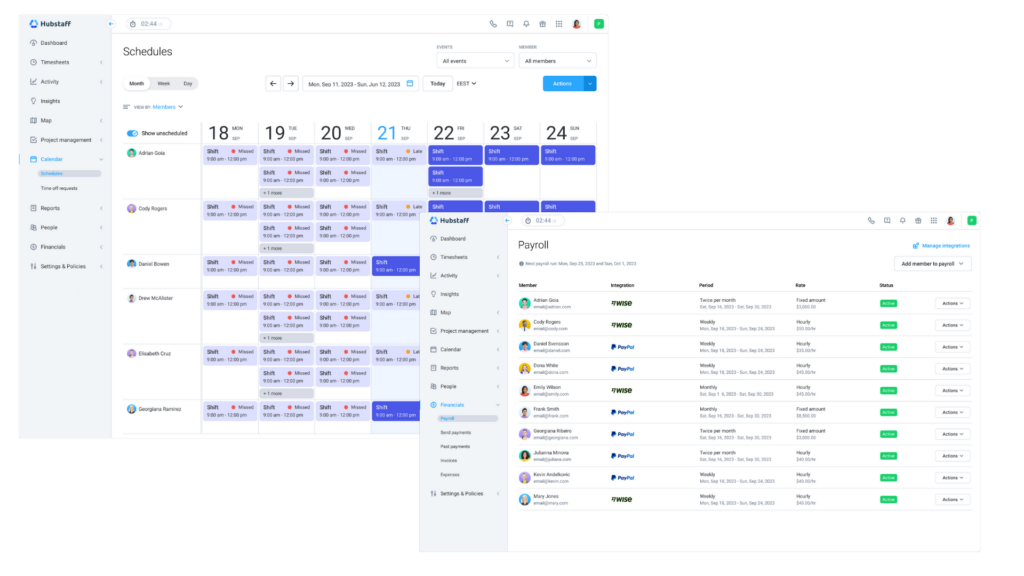
Hubstaff’s automated payroll feature pays local and international teams based on the time worked during each pay period. By removing manual calculations and administrative overhead, employers can make sure payments are accurate and on time, which keeps employees satisfied and shortens the time spent processing payroll.
With Hubstaff’s online invoicing functionality, employers can handle the whole billing process by tracking time, generating invoices, and sending them directly from the software. That means no more manual invoicing, which reduces errors and delays and helps manage cash flow more smoothly.
Hubstaff lets employers build shift schedules for each employee and receive notifications about late, missed, or abandoned shifts. This helps them plan the workforce better and keep enough staff on hand to meet project deadlines and client needs. Employers can also set alerts for work hours and project budgets for their teams, which helps avoid overwork, keep project budgets on track, and support a healthy work-life balance for employees.
Hubstaff’s project cost management feature lets employers analyze past project expenses and use that data to reduce spending on future projects. By setting and monitoring project budgets, employers can use resources better, cut costs, and make projects more profitable over time. Hubstaff also lets employers organize members and projects into teams and assign team leads, which makes collaboration and project management easier to run. This improves communication, adds accountability, and encourages team members to take ownership of their work.
Employers can also use Hubstaff to track and manage their team’s holidays and time-off requests in one place. Users can upload receipts, organize expenses, and link them to specific projects or client budgets. Employers can also set work-break policies for their teams, which makes it simpler to track lunch breaks and shifts.
Hubstaff Pricing
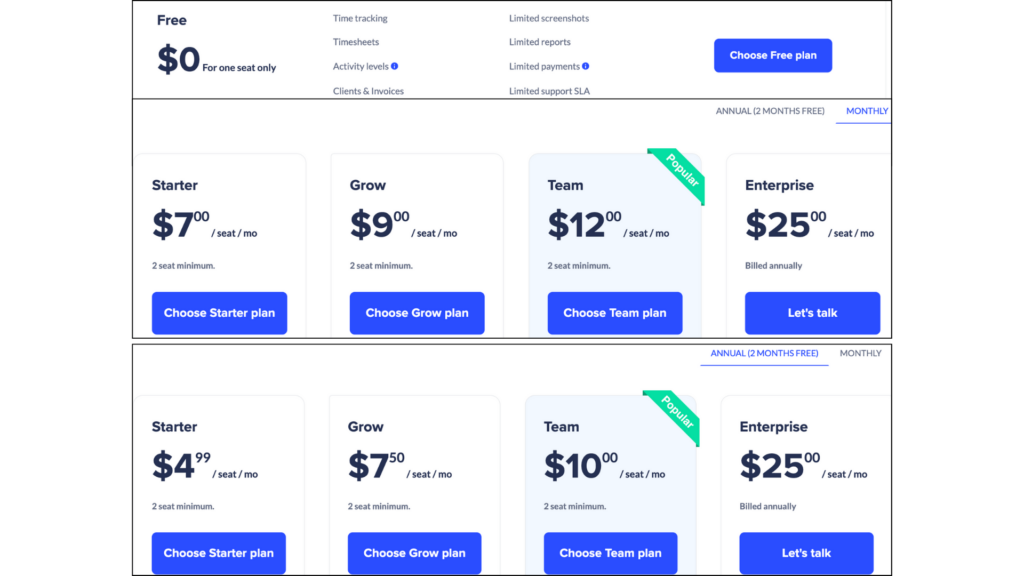
Hubstaff has pricing plans for businesses of all sizes: Free, Starter, Grow, Team, and Enterprise. The free plan, for one seat only, includes time tracking, timesheets, limited screenshots, and reports. The Starter plan, starting at $4.99 per seat per month with a minimum of two seats, covers essentials like time tracking, timesheets, and activity levels. The Grow plan, at $7.50 per seat per month with the same minimum, adds everything in Starter plus tasks, reports, 1 integration, and idle timeout.
For teams that need more, the Team plan at $10 per seat per month adds tasks, insights, unlimited screenshots, auto discard idle time, and payments & payroll. The Enterprise plan, at $25 per seat per month billed annually, includes all Grow features plus location, a corporate app, and advanced security such as HIPAA compliance and SOC-2 Type II compliance. Support options across the various plans include email and chat, so businesses have the tools and the assistance they need to manage their teams efficiently. Hubstaff also offers 14 free trial days and a 30-day money-back guarantee.
Hubstaff Reviews from Users
User reviews of Hubstaff point to many features that businesses and freelancers find helpful in their daily work. Many users appreciate how it monitors employee work, automates time tracking, and handles payment processes. The screen capture feature is especially useful for keeping remote workers productive and accountable. Integration with other tools, such as project management software and accounting platforms, makes it more useful and convenient still.
While most users praise Hubstaff for its functionality and ease of use, some have raised concerns about certain aspects. A few run into basic problems with time tracking that lead to wasted effort and financial losses. Some feel its focus leans toward management needs over the everyday practicalities that individual users care about. Others mention unexpected charges or privacy worries tied to the screen capture feature, and a few have expressed unease about potential data privacy breaches.
On the whole, users generally agree that Hubstaff is a reliable and effective tool for tracking employee time, managing projects, and improving overall productivity. Features like real-time updates and detailed reports help both businesses and freelancers get their work done. There are still areas where it could improve to fit the different needs of its users better, such as offering more customization options or smoothing out certain features so they are easier to use.
Top Hubstaff Alternatives
| Hubstaff Alternatives | Description |
|---|---|
| Monday.com | Monday.com is a cloud-based platform for managing business tasks. It focuses on improving teamwork, supporting distributed workplaces, and connecting everyone involved in a task. Users can manage their businesses with Monday.com’s project management software, work management system, video conferencing tools, and support resources. |
| Wrike | Wrike is web-based project management software built to simplify team management, tracking, and communication. Its strong task management features help users follow projects from start to finish. With Wrike, users can monitor billable hours, track time on individual tasks, create project budgets, and keep focus on the tasks that matter. |
| Smartsheet | Smartsheet is a project management application known for a user-friendly interface and ease of use. It adapts to the user’s workflow, handling tasks that range from basic checklists to detailed plans. Smartsheet gives teams clear visibility into the information they need, keeping everyone on schedule and within budget. |
| Buddy Punch | Buddy Punch is time-tracking software that lets users clock in from any location. With Buddy Punch, users can monitor labor costs in real time and open reports from any device. It uses current time-and-attendance technology to support compliance with payroll regulations and to avoid extra costs, lost time, or fines. |
| Harvest | Harvest makes time tracking simple, so users can focus on the projects they care about. It is easy to use, integrates well with accounting and tax preparation software, and is more affordable than many other options. Harvest turns team time into useful data and insight. |
| Clockify | Clockify is time-tracking software that offers a complete way to manage time and projects. It includes employee login, a web-based time tracker, and desktop time tracker software, which makes it convenient to use. With Clockify, users can generate detailed time-tracking reports that show total hours worked by project, task, and employee, among other metrics. Filter controls let users build granular reports tailored to their needs. |
Conclusion
Where every minute counts and getting things done efficiently really matters, Hubstaff stands out as a comprehensive solution for businesses. It is built around helping companies run well and manage their teams better. Through its intuitive interface and capable features, it lets employers track time accurately, monitor productivity levels, and handle administrative tasks without much fuss. User reviews highlight its effectiveness and reliability, though some functions could be smoother to use. Even so, Hubstaff remains a dependable tool for businesses that want to do well in time management, project coordination, and overall productivity.
