
Why This Blog Matters
Choosing the right benefits administration software in 2026 is key to simplifying HR, ensuring compliance, and improving employee experience. This guide reviews top platforms like Namely, Paychex Flex, UKG Pro, Benefitfocus, and PlanSource, covering features that automate enrollment, connect with payroll, and simplify regulatory tasks.
What You’ll Learn Here
A comparison of leading platforms with automated enrollment, payroll sync, self-service portals, compliance tools, and analytics. See how Namely, Benefitfocus, UKG Pro, and PlanSource differ in usability and scalability. Learn which fit small businesses vs. enterprises and discover features like decision support and carrier integrations.
Who Should Read This
Ideal for HR teams, benefits admins, business owners, and compliance leaders seeking smarter benefits management. Whether you manage a small startup or a global workforce, this guide highlights software that reduces manual work, tracks compliance, and modernizes your benefits process.
Selecting the right benefits administration software requires evaluating compliance, automation, integration with payroll and HR tools, customer support, and pricing. Some businesses prioritize AI-driven automation, while others seek customizable platforms to ensure compliance with legal regulations.
Transparent pricing, ACA and HIPAA compliance, and direct integration with HRIS and payroll systems enhance benefits management. This makes it more efficient and error-free.
This guide highlights the best benefits administration software in 2026, outlining key features and pricing to help HR teams, businesses, and benefits administrators make informed decisions.
How We Evaluated the Top Benefits Administration Tools for 2026
At Spotsaas, we are committed to providing unbiased, data-driven reviews to help businesses and individuals select the most reliable benefits administration software. Our team has meticulously researched and tested over 2,000 software solutions across various categories, including HR management, payroll integration, and employee benefits administration. This ensures that our recommendations are based on extensive analysis and real-world performance.
Each benefits administration software is evaluated based on key factors such as ease of use, customization options, compliance with regulations, integration capabilities, pricing, and customer support. We analyze user feedback, industry trends, and specific compliance requirements while conducting hands-on testing to deliver clear, transparent insights.
With our complete research and expert analysis, Spotsaas simplifies the process of finding the right benefits administration software—whether you’re managing employee health insurance, retirement plans, wellness programs, or compliance with HR regulations.
Our reviews are independent and unbiased. Some clicks may earn us a commission. This supports our ongoing testing efforts. Explore our review methodology and let us know if there’s a tool we should consider.
Quick Overview: Top 13 Benefits Administration Platforms of 2026
| Software | Best For |
|---|---|
| Gusto | Small businesses needing an all-in-one payroll and benefits solution |
| Rippling | Smooth integration with HR, IT, and payroll management |
| ADP Workforce Now | Enterprise-level benefits management and compliance |
| Workday Benefits | Large organizations with global workforce benefits |
| Paycor | Mid-sized businesses needing benefits and payroll integration |
| BambooHR | HR teams looking for intuitive benefits tracking |
| Justworks | PEO services with benefits and payroll management |
| TriNet | Outsourced benefits administration for growing businesses |
| Namely | Customizable benefits solutions with compliance tools |
| Benefitfocus | Managing complex benefits programs for enterprises |
| UKG Pro | Complete benefits tracking and employee engagement |
| Paychex Flex | Scalable benefits solutions for businesses of all sizes |
| PlanSource | Automated benefits enrollment and compliance tracking |
These platforms help HR teams simplify benefits administration, reduce compliance risks, and enhance employee satisfaction through simplified enrollment, tracking, and reporting tools.
Comparison Table: Features, Pricing & Best Use Cases of Each Platform
| Provider | Best For | Pricing Model | Features |
|---|---|---|---|
| Gusto | Small businesses needing payroll and benefits integration | Starts at $49/month + $6 per employee | Automated benefits, 401(k), health insurance |
| Rippling | All-in-one HR, payroll, and benefits | Custom pricing | Payroll sync, health benefits, automated compliance |
| ADP Workforce Now | Enterprise-level benefits management | Custom pricing | Payroll, retirement plans, health benefits |
| Workday Benefits | Large organizations managing global benefits | Custom pricing | HR and benefits integration, real-time analytics |
| Paycor | Mid-sized businesses needing payroll and benefits sync | Starts at $99/month | Benefits administration, PTO tracking, 401(k) |
| BambooHR | HR teams looking for easy benefits tracking | Starts at $6.19 per employee/month | Employee self-service, payroll integration |
| Justworks | Small businesses using PEO services | Starts at $59 per employee/month | Payroll, HR compliance, health insurance |
| TriNet | PEO and outsourced HR for growing businesses | Custom pricing | Medical, dental, and retirement benefits |
| Namely | Customizable benefits solutions for mid-sized companies | Starts at $12 per employee/month | HR, payroll, employee benefits, compliance tools |
| Benefitfocus | Managing complex benefits programs for enterprises | Custom pricing | Benefits enrollment, analytics, compliance tracking |
| UKG Pro | Complete benefits tracking and HR integration | Custom pricing | Benefits administration, payroll sync, compliance |
| Paychex Flex | Scalable benefits solutions for businesses of all sizes | Starts at $39/month + per employee fee | Benefits enrollment, payroll, retirement plans |
| PlanSource | Automated benefits enrollment and compliance tracking | Custom pricing | AI-driven benefits selection, compliance automation |
This table provides an easy comparison of the best benefits administration software to help HR teams and businesses select the right solution for managing employee benefits efficiently.
Gusto: Best All-in-One Payroll and Benefits Software for Small Businesses
Gusto
- Pricing: Starts at $49/month + $6 per employee
- Spot Score: 9.7
- Best For: Small and mid-sized businesses
Who Should Use Gusto for Benefits Administration?
Small and mid-sized businesses looking for an all-in-one payroll and benefits administration solution with direct integration, automated compliance, and easy-to-use management tools. Ideal for businesses that need health benefits, 401(k) retirement plans, PTO tracking, and employee insurance in one platform.
Gusto Pricing Plans and Add-On Costs Explained
Gusto offers tiered pricing based on the level of features required:
- Simple Plan – Starts at $49/month + $6 per employee (Includes payroll, benefits administration, and basic compliance tools)
- Plus Plan – Starts at $60/month + $9 per employee (Adds HR tools, team management, and advanced reporting)
- Premium Plan – Starts from $135/month + $16.50 per employee (Includes dedicated support, compliance assistance, and advanced integrations)
- Add-ons – Workers’ compensation, 401(k), and health benefits have additional fees
(*Pricing may vary based on location, team size, and benefits selection.)
Gusto Overview: What Is Gusto? Key Benefits and Software Capabilities
Gusto is a complete payroll and benefits administration software designed for small businesses. It simplifies the process of offering health insurance, retirement plans, and employee perks while ensuring ACA and HIPAA compliance.
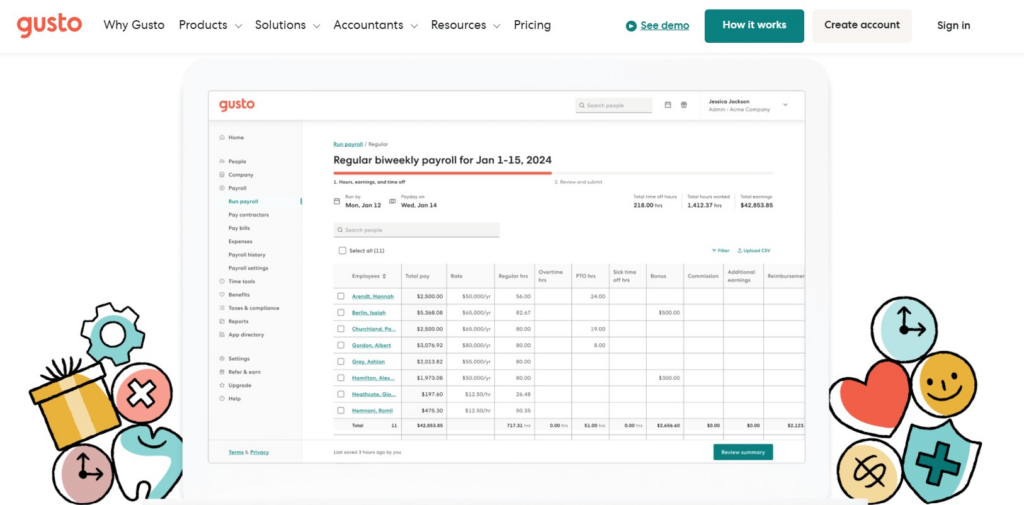
The platform automates benefits enrollment, deductions, and tax filings. This reduces administrative workload for HR teams. Gusto also integrates with HRIS and accounting tools. This makes it easy for businesses to manage payroll and benefits in one place.
Top Reasons to Choose Gusto for Benefits Management
Gusto is known for its intuitive interface, automation capabilities, and affordability. Unlike traditional benefits platforms, it offers smooth payroll integration. This ensures that deductions and contributions are calculated accurately and automatically.
The platform is particularly useful for small businesses that don’t have a dedicated HR team, as it provides self-service portals for employees, guided benefits selection, and built-in compliance tools.
Gusto’s Core Features for HR and Benefits Teams
Automated Benefits Enrollment and Payroll Sync
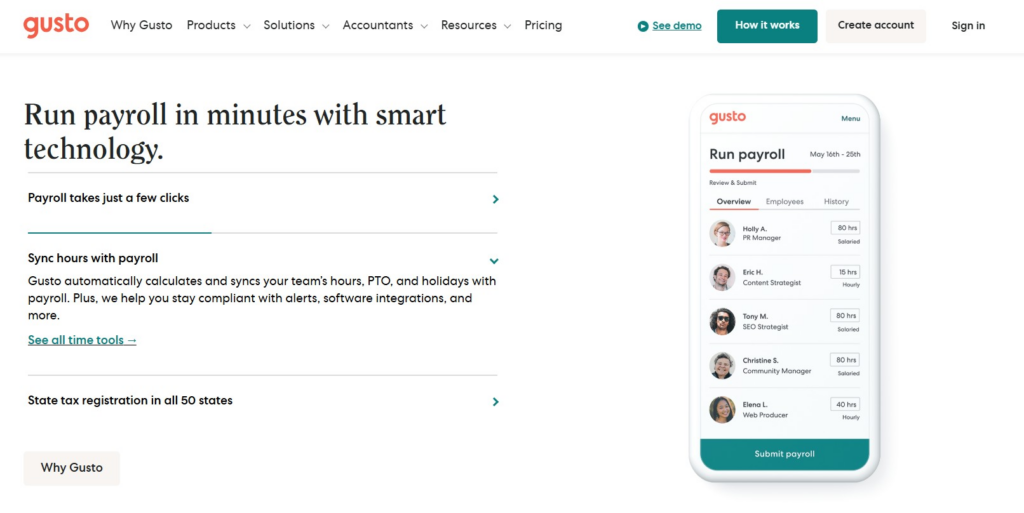
Gusto ensures smooth benefits administration by automatically integrating insurance deductions, tax calculations, and employee contributions into payroll processing.
ACA, HIPAA, and IRS Compliance
The platform helps businesses stay compliant with Affordable Care Act (ACA), HIPAA privacy rules, and IRS tax regulations. This reduces legal risks.
401k Retirement Plans and Financial Benefits
Businesses can offer 401k retirement plans, HSAs, FSAs, and commuter benefits to employees, with automated contributions and compliance tracking.
Gusto Integrations with HRIS, Payroll, and Tax Tools
Gusto integrates with HR, payroll, accounting, and compliance platforms for a simplified experience.
- HR & Payroll Integrations – BambooHR, Workday, QuickBooks, Xero
- Time Tracking & Workforce Management – TSheets, Homebase, Deputy
- Compliance & Tax Solutions – IRS, ACA Reporting Tools, E-Verify
Who Uses Gusto? Ideal Customers and Use Cases
Gusto is widely used by small and mid-sized businesses, including startups, tech companies, service-based businesses, and retail organizations. It is particularly beneficial for businesses looking for an easy-to-use payroll and benefits management solution without complex administrative overhead.
Gusto Pros and Cons for Businesses in 2026
@import url(‘https://fonts.googleapis.com/css2?family=Poppins:wght@300;400;600&display=swap’);
| Pros | Cons |
|---|---|
| All-in-one payroll and benefits administration | Limited to businesses in the U.S. |
| Automated compliance with ACA, HIPAA, and IRS | Pricing can increase with add-ons |
| Smooth payroll sync for benefits deductions | No direct international benefits support |
| Employee self-service and mobile access | |
| Integrates with major HR and accounting tools |
Final Verdict: Is Gusto Right for Your Business?
Gusto is a top choice for small businesses looking for an affordable, easy-to-use benefits administration solution with integrated payroll. Its automated compliance, self-service features, and smooth HR integrations make it a strong option for companies that want to simplify benefits enrollment and payroll deductions.
While larger businesses needing global benefits may require a different solution, Gusto remains an excellent option for small to mid-sized teams looking for hassle-free employee benefits management.
Rippling : Best Unified HR, Payroll, and Benefits Software
Rippling
- Pricing: Starts at $8 per employee/month
- Spot Score: 9.4
- Best For: All-in-one HR, payroll, and benefits
Who Should Choose Rippling for Benefits Administration?
Businesses of all sizes are looking for a complete, automated solution that integrates HR, payroll, benefits administration, IT management, and compliance tools into a single platform. Ideal for companies that need scalable benefits solutions with AI-driven automation and direct integrations.
Rippling Pricing: Core Plans and Add-Ons Overview
Rippling follows a modular pricing model, meaning businesses pay for the features they need:
- Core HR & Payroll Plan – Starts at $8 per employee/month (Includes payroll and basic HR functions)
- Benefits Administration Add-on – Custom pricing (Offers health, retirement, and wellness benefits)
- Global Workforce Management – Custom pricing (For businesses with international teams)
- Additional Add-ons – Includes IT device management, time tracking, and compliance tools
(*Pricing depends on company size, selected features, and contract terms.)
Rippling Overview: What Is Rippling? Full Breakdown of Features and Benefits
Rippling is an end-to-end workforce management platform that brings together HR, payroll, and benefits administration in a single, automated system. It simplifies employee benefits enrollment, payroll deductions, and compliance tracking, making it easy for businesses to manage health insurance, 401k plans, commuter benefits, and wellness programs.
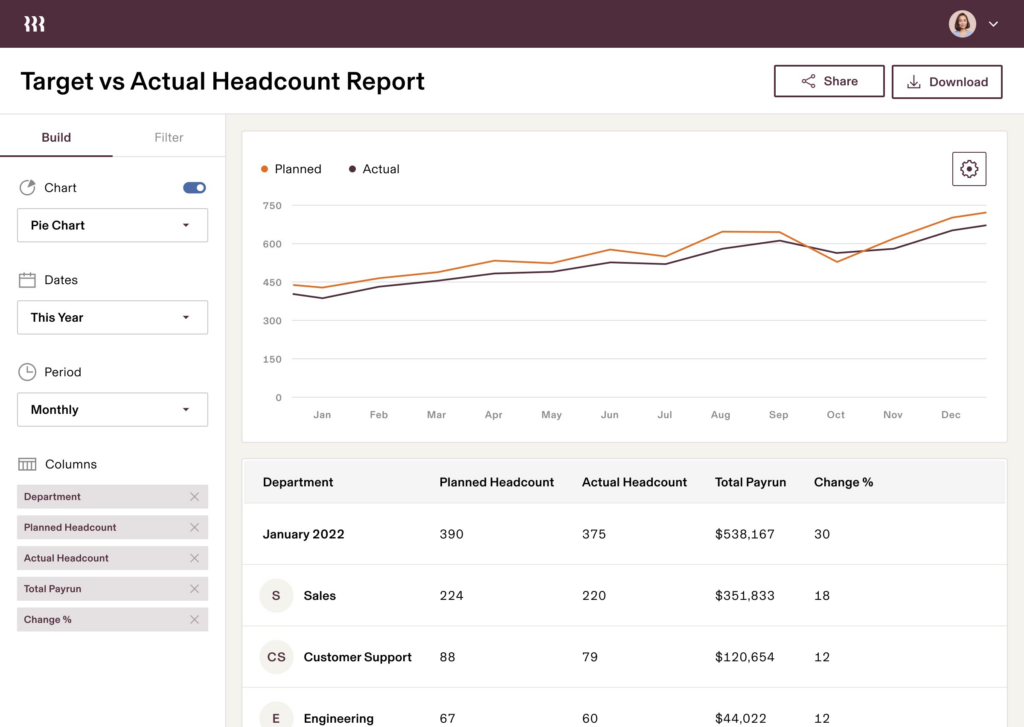
With automation-driven workflows, real-time benefits tracking, and smooth HR integrations, Rippling eliminates manual administrative tasks. This ensures accuracy and compliance across multiple business functions.
Why Rippling Is a Smart Choice for Modern HR Teams
Rippling is a strong a one-stop HR solution, combining payroll, benefits, and workforce automation with AI-powered analytics. Unlike traditional benefits platforms, it extends beyond HR by offering IT and device management for remote teams, making it ideal for modern, tech-driven companies.
Its deep integrations with third-party benefits providers allow businesses to offer customized employee benefits while maintaining real-time payroll deductions and compliance tracking.
Top Rippling Features for Automating HR & Benefits
Flexible Benefits Customization
Companies can offer custom benefits packages, including health insurance, commuter benefits, wellness stipends, and flexible spending accounts (FSAs/HSAs).
AI-Driven Analytics and Insights
Rippling provides real-time data insights on benefits costs, employee participation, and payroll deductions. This helps businesses optimize their HR and finance strategies.
Global Workforce Benefits Management
For multinational businesses, Rippling supports international payroll and benefits administration. This allows companies to manage remote teams and cross-border benefits.
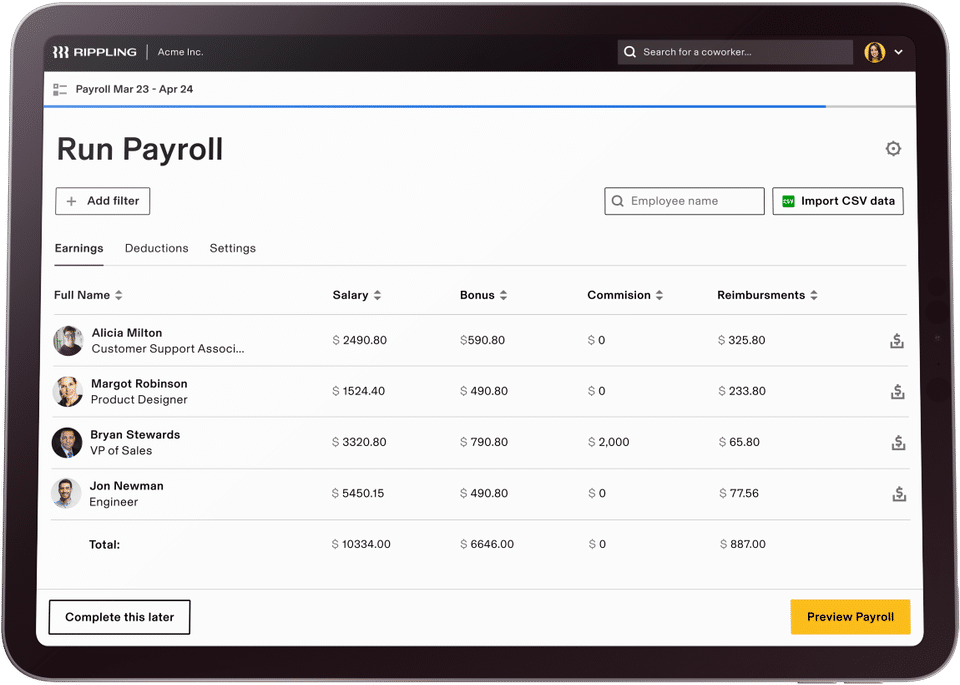
Rippling Integrations with Payroll, HRIS, and Compliance Tools
Rippling connects with HR, payroll, compliance, and third-party benefits providers for a fully automated experience.
- HR & Payroll Integrations – QuickBooks, BambooHR, Workday, ADP
- Benefits Providers – Blue Cross Blue Shield, Aetna, Guardian, Voya Financial
- Compliance & Tax Solutions – IRS, E-Verify, ACA Reporting, COBRA Administration
Who Uses Rippling? Target Users and Business Fit
Rippling is widely used by startups, mid-sized businesses, and large enterprises that require automation-first benefits management with payroll and HR integration. It is popular among tech-driven companies, global organizations, and fast-scaling businesses that need an efficient and modern HR solution.
Rippling Pros and Cons: What to Expect in 2026
@import url(‘https://fonts.googleapis.com/css2?family=Poppins:wght@300;400;600&display=swap’);
| Pros | Cons |
|---|---|
| All-in-one HR, payroll, and benefits platform | Custom pricing can be costly for small businesses |
| Automated benefits administration and payroll sync | Limited international benefits options |
| Compliance with ACA, HIPAA, and IRS regulations | Requires add-ons for advanced features |
| AI-powered analytics and cost tracking | |
| Smooth integration with third-party benefits providers |
Is Rippling the Best Benefits Software for Your Business?
Rippling is a powerful, automation-driven benefits administration platform that integrates directly with payroll, HR, and compliance management. With customizable benefits packages, AI-powered insights, and smooth third-party integrations, it is an ideal choice for businesses looking for a tech-driven HR solution.
While custom pricing may be expensive for smaller businesses, Rippling remains an excellent option for fast-scaling organizations that need a modern, end-to-end HR and benefits management system.
ADP Workforce Now: Best for Enterprise Benefits Management
ADP Workforce Now
- Pricing: Custom
- Spot Score: 8.9
- Best For: Medium to large businesses
Who Should Use ADP Workforce Now for Benefits Administration?
Medium to large businesses that need a complete benefits administration solution integrated with payroll, HR, and compliance management. It is ideal for organizations requiring automated benefits enrollment, compliance tracking, and direct integration with insurance providers and financial institutions.
ADP Workforce Now Pricing and Plan Details
ADP Workforce Now offers custom pricing based on business size and selected features.
- Essential Plan – Custom pricing (Includes payroll, tax filing, and basic HR tools)
- Enhanced Plan – Custom pricing (Adds benefits administration, time tracking, and compliance management)
- Complete Plan – Custom pricing (Includes talent management, recruiting, and advanced analytics)
- HR Pro Plan – Custom pricing (Full HR suite with compliance and legal support)
- Add-ons – Health insurance, retirement plans, COBRA administration, and workers’ compensation coverage are available for an additional fee
Pricing depends on the number of employees, industry, and required features.
Overview of ADP Workforce Now
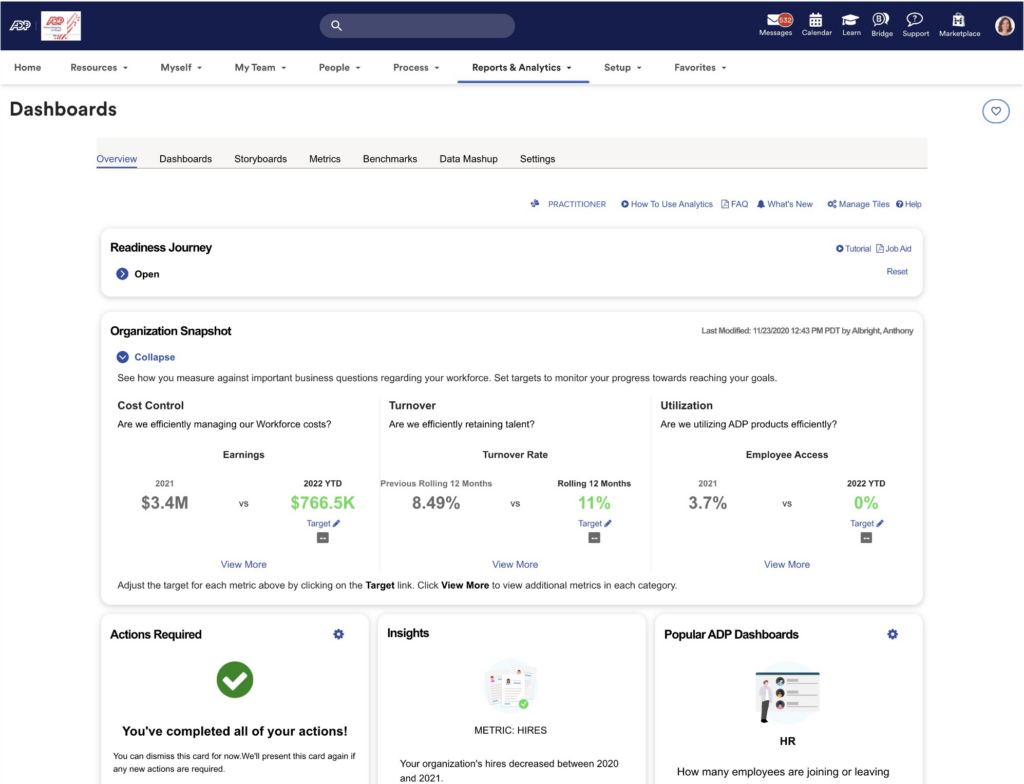
ADP Workforce Now is a cloud-based platform that combines payroll, HR, and benefits administration into a single system. It automates benefits enrollment, tracks employee contributions, and ensures compliance with ACA, HIPAA, and IRS regulations. The system provides self-service options for employees. This makes it easy to review and select benefits while integrating smoothly with insurance carriers and third-party providers.
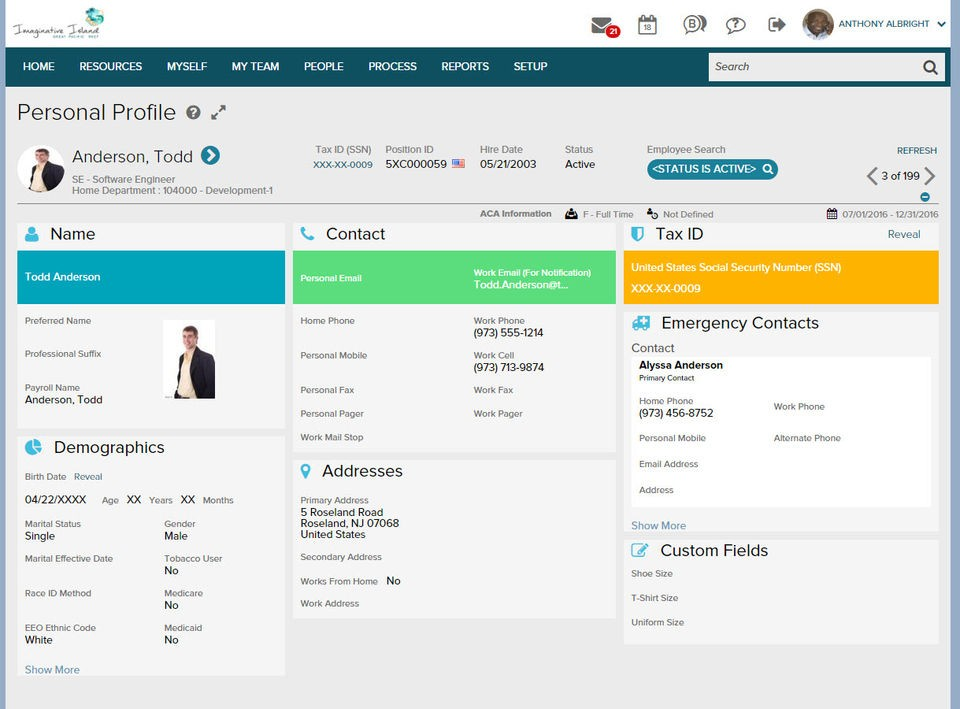
The platform is designed for businesses that need a scalable solution capable of managing complex benefits programs, including health insurance, retirement savings plans, wellness programs, and voluntary benefits. It helps businesses reduce administrative burdens while providing accurate reporting and compliance management.
Top Reasons to Select ADP Workforce Now for HR Compliance
ADP Workforce Now simplifies benefits administration by automating the enrollment process, reducing manual data entry, and integrating with payroll to ensure accurate deductions. It provides real-time compliance tracking, which helps businesses avoid penalties for non-compliance with ACA, HIPAA, and tax regulations.
The platform offers extensive customization. This allows businesses to tailor benefits offerings to employee needs. It integrates with major insurance providers and supports flexible benefits packages, including medical, dental, vision, and financial wellness programs.
Key Benefits Features of ADP Workforce Now Explained
Automated Benefits Enrollment and Payroll Integration
Employees can enroll in benefits through a self-service portal, with automatic deductions integrated into payroll processing.
ACA, HIPAA, and IRS Compliance Management
The platform ensures businesses meet federal and state regulations with built-in compliance tracking, reporting, and notifications for key deadlines.
401k and Retirement Plan Administration
Employers can offer and manage 401k, IRA, and pension plans with automated payroll deductions and contribution tracking.
HR, Payroll, and Insurance Integrations with ADP Workforce Now
ADP Workforce Now integrates with HR, payroll, accounting, and compliance systems for a smooth experience.
- HR & Payroll Integrations – Workday, SAP SuccessFactors, BambooHR
- Insurance & Benefits Providers – Aetna, Cigna, Blue Cross Blue Shield, Voya Financial
- Compliance & Tax Solutions – IRS, ACA Reporting, COBRA Administration
Who Uses ADP Workforce Now? Ideal Industries & Businesses
ADP Workforce Now is widely used by medium to large businesses, including enterprises, healthcare organizations, financial institutions, and government agencies. It is designed for companies that require a centralized benefits administration system with advanced compliance tools and direct integration with payroll and HR functions.
Pros and Cons of ADP Workforce Now
@import url(‘https://fonts.googleapis.com/css2?family=Poppins:wght@300;400;600&display=swap’);
| Pros | Cons |
|---|---|
| Complete benefits administration with payroll integration | Custom pricing may be expensive for small businesses |
| Automated compliance tracking for ACA, HIPAA, and IRS | Initial setup and customization can be complex |
| Employee self-service portal for benefits enrollment | Requires additional add-ons for full HR suite |
| Direct integration with major insurance providers | |
| Scalable solution for mid-sized to large enterprises |
Should You Choose ADP Workforce Now for Benefits Management?
ADP Workforce Now is a powerful benefits administration solution for businesses that need automated benefits management, compliance tracking, and payroll integration. It is ideal for medium to large organizations that require a scalable and customizable system to handle employee benefits efficiently.
While the platform offers extensive features, smaller businesses may find the pricing and complexity more suited for larger teams. However, for companies that need an enterprise-grade benefits solution, ADP Workforce Now provides a reliable and compliant platform for managing health, retirement, and employee perks.
Workday Benefits: Best Benefits Management Platform for Global Enterprises
Workday Benefits
- Pricing: Custom
- Compliance: ACA, GDPR
- Best For: Enterprise-level benefits management
Who Should Use Workday for Benefits Administration?
Large enterprises, multinational corporations, and organizations that require a complete, cloud-based benefits administration system with AI-driven automation, compliance tracking, and direct integration with HR and payroll. Ideal for businesses managing complex benefits programs across multiple locations.
Workday Benefits Pricing and Add-On Options
Workday Benefits offers custom pricing based on business size, industry, and specific requirements.
- Core HR & Benefits Package – Custom pricing (Includes benefits enrollment, payroll sync, and compliance tools)
- Advanced Benefits Management – Custom pricing (Adds AI-powered decision support, global benefits tracking, and analytics)
- Workday HCM Suite – Custom pricing (Includes full HR, payroll, and talent management solutions)
- Add-ons – Additional features such as retirement planning, wellness programs, and benefits benchmarking are available for an extra cost
Pricing varies based on company needs, employee count, and selected features.
Workday Benefits Overview: Key Capabilities and Use Cases
Workday Benefits is a cloud-based benefits administration platform designed for large-scale organizations and global enterprises. It automates employee benefits enrollment, compliance reporting, and payroll integration. This ensures smooth benefits management across different regions.
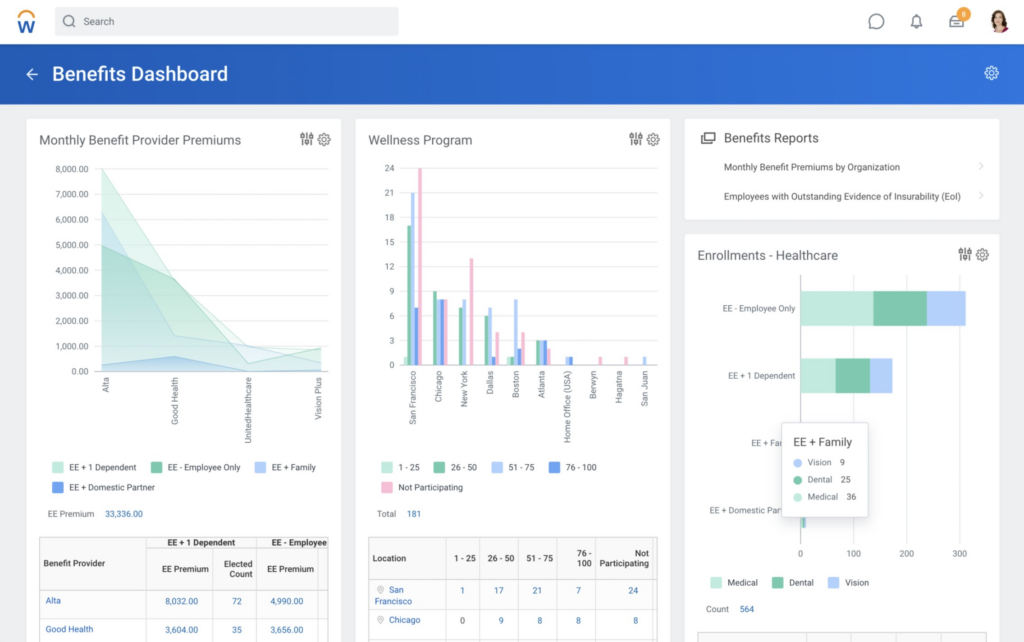
With real-time analytics, AI-powered decision support, and global workforce tracking, Workday Benefits simplifies the complexities of managing health insurance, retirement plans, and employee perks. It provides a centralized system for HR teams. This allows them to customize benefits offerings and optimize costs.
Why Workday Is Ideal for Complex, Multi-Country Benefits Programs
Workday Benefits is built for enterprise-level benefits administration, offering deep analytics, automated workflows, and real-time compliance tracking. Unlike traditional benefits management systems, Workday provides AI-driven recommendations. This helps employees choose the best benefits options based on their needs and financial goals.
The platform is highly configurable. This makes it ideal for businesses with diverse benefits structures across different countries. It supports third-party benefits providers and payroll integrations. This ensures smooth administration for multinational teams.
Core Features of Workday Benefits for Large Organizations
Automated Benefits Enrollment with Payroll Sync
Employees can enroll in health, dental, vision, and retirement plans with automatic payroll deductions and contribution tracking.
Global Benefits Administration and Multi-Country Compliance
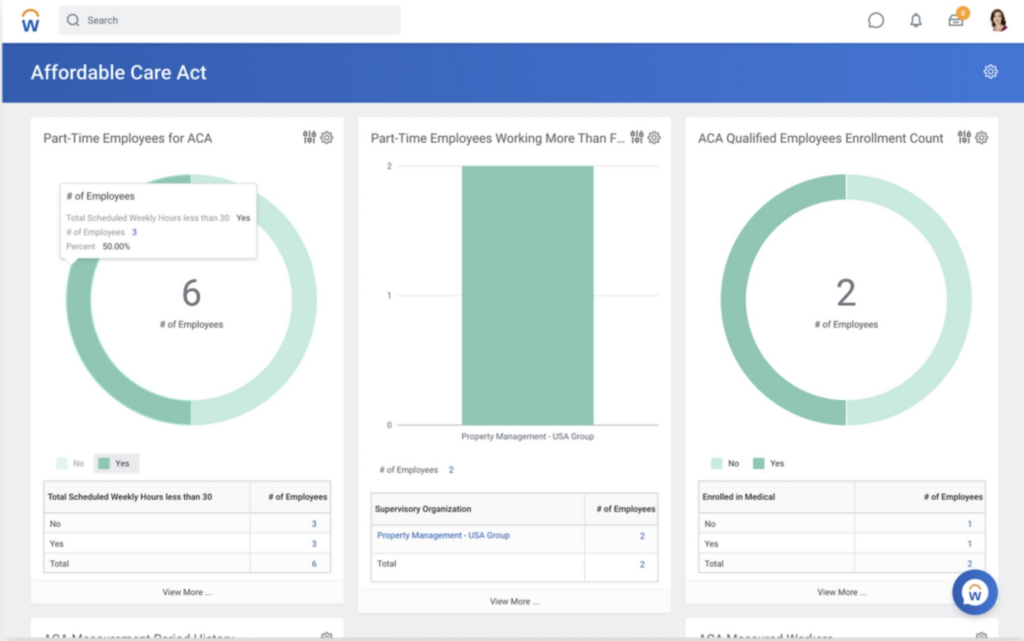
Workday Benefits supports multi-country benefits programs, ensuring businesses comply with local labor laws, ACA, HIPAA, and GDPR regulations.
AI-Powered Benefits Recommendations
The platform offers AI-driven decision support, guiding employees toward the most cost-effective and suitable benefits options.
Workday Benefits Integrations: Payroll, HRIS, and Compliance Tools
Workday Benefits integrates directly with HR, payroll, and compliance platforms for a fully automated employee benefits experience.
- HR & Payroll Integrations – Workday HCM, ADP, SAP SuccessFactors, Oracle
- Benefits & Insurance Providers – Aetna, Cigna, Blue Cross Blue Shield, Vanguard
- Compliance & Legal Solutions – IRS, ACA Reporting, GDPR Compliance
Who Uses Workday Benefits? Key Industries and Business Types
Workday Benefits is widely used by large enterprises, multinational corporations, and complex organizations that need scalable benefits administration across different regions. It is commonly used in industries such as healthcare, finance, technology, and manufacturing, where managing benefits compliance and employee engagement is critical.
Pros and Cons of Workday Benefits
@import url(‘https://fonts.googleapis.com/css2?family=Poppins:wght@300;400;600&display=swap’);
| Pros | Cons |
|---|---|
| Enterprise-level benefits administration with global coverage | Custom pricing may be expensive for small businesses |
| AI-driven benefits recommendations for employees | Requires configuration and training for new users |
| Smooth payroll and benefits synchronization | Limited flexibility for smaller companies with basic needs |
| Compliance with ACA, HIPAA, GDPR, and local labor laws | |
| Real-time analytics and cost optimization tools |
Should You Choose Workday for Enterprise Benefits Management?
Workday Benefits is an enterprise-grade benefits administration platform designed for large organizations managing complex benefits programs across multiple locations. With AI-driven decision support, automated payroll synchronization, and global compliance tracking, it helps businesses optimize employee benefits while reducing administrative workload.
While smaller businesses may find the platform more advanced than necessary, Workday Benefits remains an excellent choice for multinational companies that need scalable and data-driven benefits management solutions.
Paycor: Best Benefits Administration Software for Mid-Sized Businesses
Paycor
- Pricing: $99/month + per employee fee
- Spot Score: 9.6
- Best For: Mid-sized businesses
Who Should Choose Paycor for Benefits and Payroll Integration?
Mid-sized businesses looking for an all-in-one payroll and benefits administration solution with built-in compliance management, employee self-service options, and smooth HR integration. It is ideal for companies needing automated benefits enrollment, payroll synchronization, and workforce analytics to simplify HR operations.
Paycor Pricing Plans and Optional Add-Ons Explained
Paycor offers tiered pricing based on the number of employees and selected features.
- Basic Plan – Starts at $99/month + per employee fee (Includes payroll, tax filing, and benefits tracking)
- Essential Plan – Custom pricing (Adds employee self-service, time tracking, and compliance tools)
- Complete Plan – Custom pricing (Includes full HR, onboarding, and reporting features)
- Enterprise Plan – Custom pricing (For businesses needing custom workflows, analytics, and advanced automation)
- Add-ons – Health benefits, 401(k) retirement plans, workers’ compensation, and wellness programs available for additional fees
Pricing varies based on company size and selected features.
Paycor Overview: What Is Paycor? Benefits Administration for Mid-Sized Teams
Paycor is a cloud-based HR and benefits administration platform designed for mid-sized businesses. It simplifies payroll processing, benefits enrollment, and compliance tracking. This allows HR teams to manage employee benefits efficiently while ensuring accurate payroll deductions.
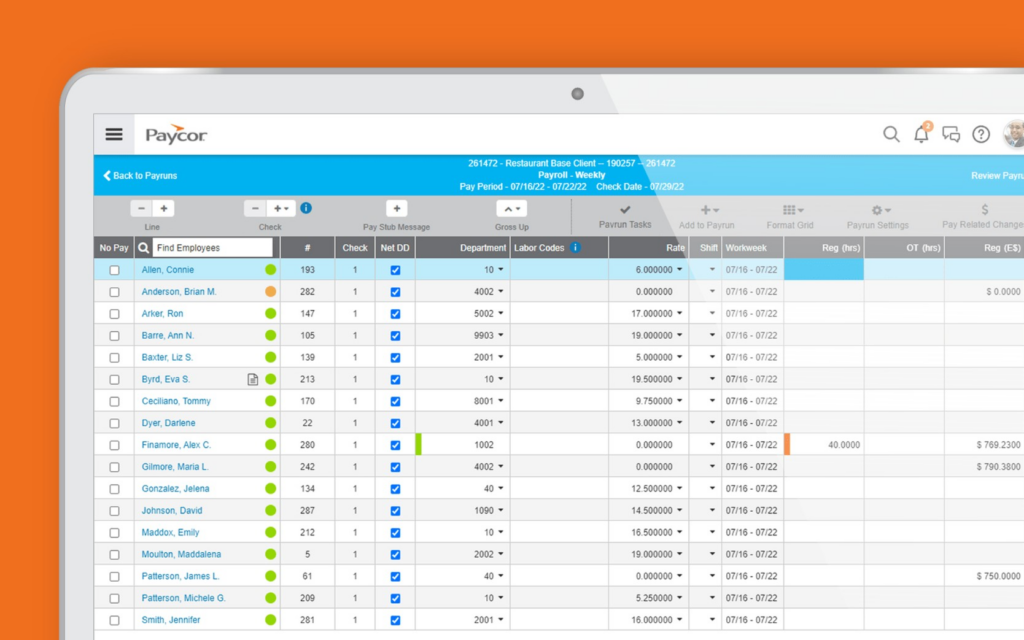
With a focus on automation and workforce insights, Paycor helps businesses reduce administrative work, track employee engagement, and optimize benefits costs. It provides self-service tools for employees, making it easy to select benefits, update coverage, and manage contributions from a single platform.
Top Reasons to Use Paycor for HR and Benefits Management
Paycor offers smooth payroll and benefits integration, ensuring that health, dental, vision, and retirement contributions are automatically calculated and deducted. Unlike basic HR platforms, it provides real-time compliance tracking, reducing the risk of penalties related to ACA, HIPAA, and IRS regulations.
The platform also offers customized benefits packages. This allows businesses to tailor employee perks based on company policies and workforce needs. With built-in analytics and reporting tools, HR teams can gain insights into benefits utilization, costs, and employee preferences.
Key Paycor Features for Benefits Tracking and Payroll Sync
Automated Benefits Enrollment and Payroll Sync
Employees can enroll in health, dental, vision, and financial benefits with automated payroll deductions and real-time tracking.
Employee Self-Service Benefits Portal
Employees can access a mobile-friendly benefits portal to enroll in coverage, make changes, and track deductions.
Workforce Analytics and Reporting
HR teams can monitor benefits enrollment trends, cost breakdowns, and employee participation rates through advanced analytics dashboards.
Paycor Integrations with Payroll, HR, and Compliance Systems
Paycor integrates with HR, payroll, accounting, and compliance platforms for a simplified benefits administration experience.
- HR & Payroll Integrations – Workday, QuickBooks, BambooHR, ADP
- Benefits & Insurance Providers – Aetna, Cigna, Blue Cross Blue Shield, MetLife
- Compliance & Tax Solutions – IRS, ACA Reporting, COBRA Administration
Who Uses Paycor? Ideal Business Sizes and Industries
Paycor is widely used by mid-sized businesses, professional service firms, healthcare organizations, and retail businesses that require automated benefits administration, payroll integration, and compliance tracking. It is particularly popular among HR teams seeking a easy-to-use platform to manage employee benefits efficiently.
Paycor Pros and Cons for Benefits Admin in 2026
@import url(‘https://fonts.googleapis.com/css2?family=Poppins:wght@300;400;600&display=swap’);
| Pros | Cons |
|---|---|
| All-in-one payroll and benefits management | Custom pricing can be costly for smaller businesses |
| Automated compliance tracking for ACA, HIPAA, and IRS | Some advanced reporting features require add-ons |
| Smooth payroll integration for benefits deductions | Health insurance availability may vary by state |
| Employee self-service portal with mobile access | |
| Complete benefits tracking and analytics |
Final Verdict: Is Paycor the Right Fit for Your Business?
Paycor is a powerful benefits administration platform designed for mid-sized businesses looking for automated payroll and benefits integration. With compliance tracking, employee self-service options, and workforce analytics, it helps businesses simplify benefits management while reducing administrative workload.
While smaller businesses may find the pricing higher than basic HR platforms, Paycor remains a strong choice for companies needing scalable benefits administration, payroll automation, and compliance support.
BambooHR: Best Simple Benefits Administration Software for Growing Companies
BambooHR
- Pricing: Custom
- Spot Score: 9.8
- Best For: Small to Mid-sized businesses
Who Should Use BambooHR for Managing Employee Benefits?
Small to mid-sized businesses looking for an intuitive and easy-to-use benefits administration solution that integrates with payroll and HR systems. It is ideal for HR teams that need a simplified platform for tracking employee benefits, managing open enrollment, and ensuring compliance without complex administrative processes.
BambooHR Pricing: Plans, Add-Ons, and What to Expect
BambooHR offers custom pricing based on company size and selected features.
- Essentials Plan – Custom pricing (Includes core HR, employee records, and time-off tracking)
- Advantage Plan – Custom pricing (Adds payroll integration, benefits tracking, onboarding, and reporting tools)
- Add-ons – Payroll processing, performance management, and time tracking are available at an additional cost
Pricing varies depending on the number of employees and selected features.
BambooHR Overview: Benefits Tracking for Small and Mid-Sized Businesses
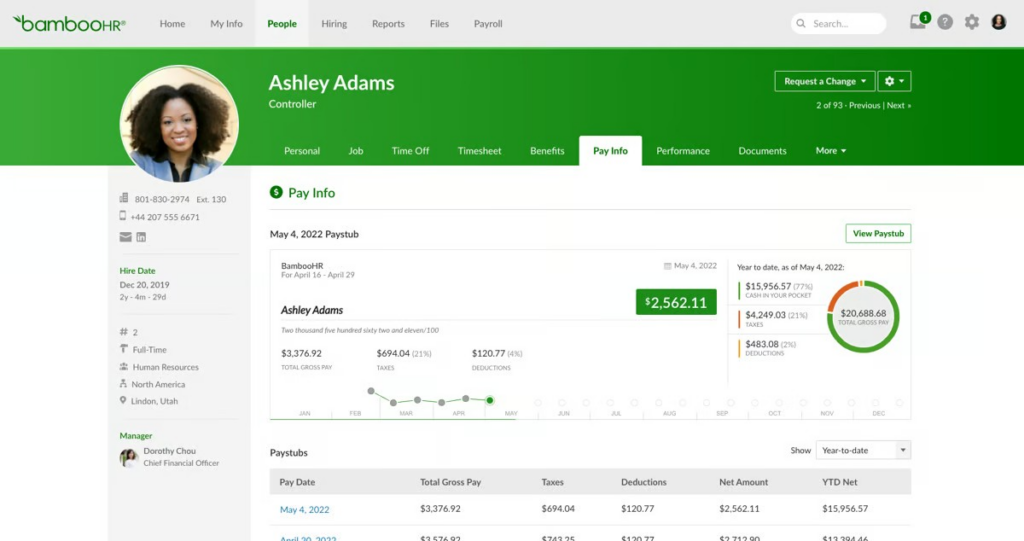
BambooHR is an all-in-one human resources platform that simplifies benefits administration by providing easy tracking, employee self-service, and integration with payroll providers. It allows HR teams to manage health insurance, retirement plans, and other employee benefits without the need for complex configurations.
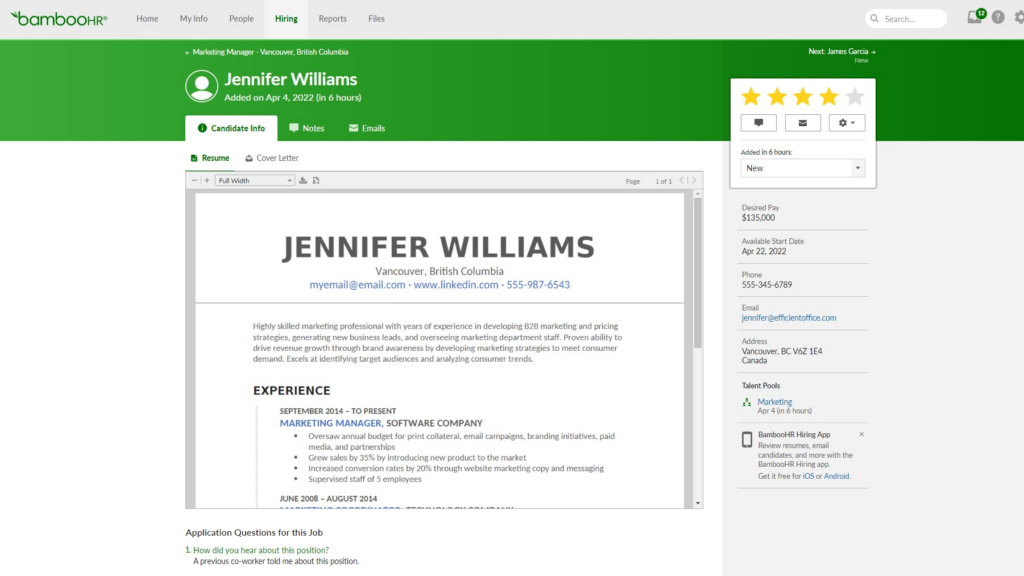
HR teams can automate benefits tracking and generate reports to analyze benefits participation and costs. BambooHR ensures compliance with benefits regulations and simplifies communication between employers and benefits providers.
Why BambooHR Is a Top Choice for Simplicity and Integration
BambooHR provides a simple and effective way to manage employee benefits while integrating smoothly with payroll and HR systems. Unlike enterprise-grade benefits platforms, BambooHR is built for growing businesses that need a flexible and easy-to-use solution. The platform offers an intuitive dashboard that allows HR teams to monitor benefits status, track employee contributions, and ensure compliance.
With an employee-focused approach, BambooHR gives workers to take control of their benefits through a self-service portal. The platform also integrates with third-party benefits providers. This makes it easy to offer customized benefits packages.
Esssential Features of BambooHR for Benefits Management
Employee Benefits Tracking
HR teams can easily track health insurance, retirement plans, and other benefits in a centralized system.
Smooth Payroll and Benefits Integration
BambooHR connects with payroll providers to ensure accurate deductions and benefits contributions.
Employee Self-Service Portal
Employees can enroll in benefits, review coverage options, and update their selections through an intuitive portal.
Automated Benefits Administration
HR teams can automate benefits tracking, enrollment reminders, and compliance reporting.
BambooHR Integrations with Payroll and Benefits Providers
BambooHR integrates with various payroll and HR systems to provide smooth benefits administration.
- Payroll & HR Integrations – QuickBooks, Gusto, ADP, Rippling
- Benefits Providers – Aetna, Cigna, Blue Cross Blue Shield
- Compliance & Reporting – ACA Reporting, IRS, E-Verify
Who Uses BambooHR? Target Customers and Industry Fit
BambooHR is used by small and mid-sized businesses across various industries, including technology, healthcare, and retail. It is ideal for companies that need a simple yet effective solution to manage employee benefits without the complexity of enterprise-level HR systems.
BambooHR Benefits Platform: Pros and Cons Explained
@import url(‘https://fonts.googleapis.com/css2?family=Poppins:wght@300;400;600&display=swap’);
| Pros | Cons |
|---|---|
| Easy-to-use benefits tracking for HR teams | Limited customization options for complex benefits plans |
| Smooth integration with payroll providers | Advanced benefits features may require third-party integrations |
| Employee self-service portal for benefits enrollment | No built-in benefits marketplace for direct carrier enrollment |
| Automated tracking and compliance support | |
| Ideal for small and mid-sized businesses |
Is BambooHR Right for Your Business’s Benefits Needs?
BambooHR is a great solution for businesses looking for an easy-to-use platform to track employee benefits and integrate with payroll systems. Self-service tools, automation, and compliance support help HR teams simplify benefits administration without the complexity of enterprise systems.
While it may not offer the advanced customization options of larger platforms, BambooHR remains a top choice for small and mid-sized businesses that need a reliable and easy-to-use benefits management solution.
Justworks : Best PEO Platform for Benefits and Payroll Services
Justworks
- Pricing: Starts at $59 per employee/month
- Spot Score: 9.2
- Best For: Small and Mid-sized businesses
Who Should Use Justworks for PEO and Benefits Administration?
Small and mid-sized businesses that need a professional employer organization (PEO) solution to manage payroll, benefits administration, compliance, and HR tasks in one platform. It is ideal for companies looking for a cost-effective way to offer employee benefits without handling complex administrative processes in-house.
Justworks Pricing: Plans, Benefits, and Add-On Options
Justworks offers transparent, tiered pricing based on company size and selected features.
- Basic Plan – Starts at $59 per employee/month (Includes payroll, compliance support, and HR tools)
- Plus Plan – Starts at $99 per employee/month (Adds health insurance, 401(k) plans, and wellness benefits)
- Add-ons – Includes workers’ compensation, life insurance, and commuter benefits for an additional fee
Pricing varies depending on company size and benefits selection.
Justworks Overview: Full-Service Benefits and HR Support
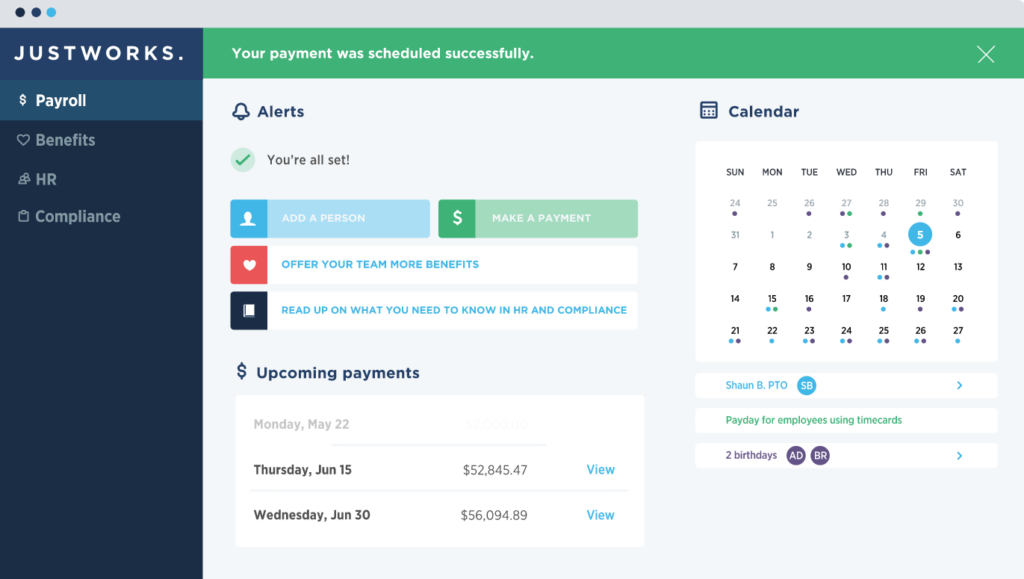
Justworks is an all-in-one HR and payroll platform that acts as a PEO, helping businesses manage employee benefits, compliance, and tax filings. It allows companies to offer competitive benefits packages, including health, dental, vision, and retirement plans, without needing a dedicated HR team.
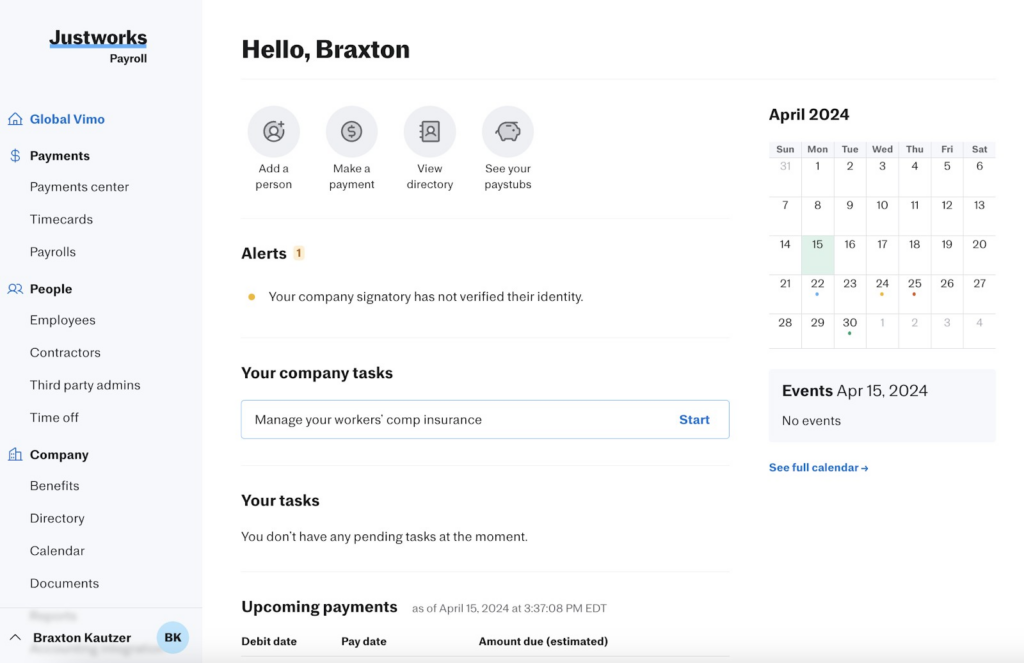
By partnering with large insurance providers, Justworks enables small businesses to access affordable group health insurance plans. The platform also automates payroll processing, ensuring that benefits deductions, tax filings, and compliance requirements are handled efficiently.
Top Reasons to Choose Justworks for Simplified HR and Benefits
Justworks simplifies benefits administration by handling compliance, payroll deductions, and enrollment processes for businesses. Unlike standalone HR software, it functions as a co-employer. This allows businesses to access better benefits rates and reduce administrative workload.
The platform also provides employee self-service tools, allowing workers to manage their benefits selections, review coverage, and access support through a easy-to-use dashboard.
Key Features of Justworks for Benefits, Payroll, and Compliance
Complete Benefits Administration
Provides access to health, dental, vision, 401k plans, and wellness programs through top-tier insurance providers.
Payroll and Benefits Synchronization
Ensures that employee benefits deductions are automatically calculated and integrated into payroll processing.
Workers’ Compensation and Business Insurance
Offers workers’ compensation plans and liability insurance coverage for businesses needing risk management support.
PEO Services with Group Benefits
Small businesses can access group benefits plans typically reserved for larger organizations. This reduces costs for health insurance and other employee perks.
Justworks Integrations with Payroll and Benefits Platforms
Justworks integrates with payroll, HR, and accounting platforms to simplify administrative processes.
- Payroll & Accounting Integrations – QuickBooks, Xero, NetSuite
- Benefits & Insurance Providers – Aetna, MetLife, Kaiser Permanente, UnitedHealthcare
- Compliance & Tax Solutions – ACA Reporting, IRS, E-Verify
Who Uses Justworks? Best Use Cases and Company Profiles
Justworks is commonly used by small and mid-sized businesses that need a full-service PEO solution for payroll and benefits administration. It is ideal for startups, remote teams, and growing businesses that want to offer competitive benefits without the burden of managing HR tasks internally.
Justworks Pros and Cons: What Businesses Need to Know
@import url(‘https://fonts.googleapis.com/css2?family=Poppins:wght@300;400;600&display=swap’);
| Pros | Cons |
|---|---|
| PEO services provide access to cost-effective group benefits | Higher pricing compared to standalone HR and payroll tools |
| Automated payroll and benefits administration | Limited benefits customization compared to traditional brokers |
| Compliance support for ACA, HIPAA, and tax regulations | Not ideal for businesses that want full control over HR processes |
| Employee self-service tools for benefits enrollment | |
| Easy-to-use platform with dedicated customer support |
Final Verdict: Is Justworks the Best PEO for You?
Justworks is a great solution for businesses that need a PEO service to handle benefits administration, payroll processing, and compliance management. Offering access to affordable group benefits plans, automated payroll integration, and legal compliance support helps small businesses compete with larger organizations in terms of employee benefits.
While the pricing may be higher than traditional HR software, Justworks is an excellent option for businesses that want a full-service HR solution without the complexity of managing benefits and compliance in-house.
TriNet : Full-Service PEO for Benefits, Payroll, and Compliance
TriNet
- Pricing: Custom
- Compliance: ACA, HIPAA
- Best For: Small and Mid-sized businesses
Who Should Consider TriNet for Benefits Administration?
Small and mid-sized businesses need a full-service professional employer organization (PEO) to handle benefits administration, payroll, HR compliance, and risk management. It is ideal for companies looking to offer high-quality employee benefits while outsourcing administrative HR tasks.
TriNet Pricing Structure and Services Overview
TriNet offers custom pricing based on company size, industry, and specific needs.
- PEO Services – Custom pricing (Includes payroll, HR support, compliance management, and benefits administration)
- Benefits Packages – Custom pricing (Includes health, dental, vision, retirement plans, and wellness programs)
- Add-ons – Workers’ compensation, life insurance, commuter benefits, and employee perks available for an additional fee
Pricing depends on employee count, industry, and benefits selection.
TriNet Overview: What Is TriNet? Benefits Admin and HR Support for SMBs
TriNet is a PEO solution that provides small and mid-sized businesses with access to enterprise-level employee benefits. It manages payroll, benefits enrollment, risk mitigation, and compliance. This allows companies to focus on their core operations. Businesses that partner with TriNet can offer employees competitive health insurance plans, retirement savings options, and wellness programs through top-tier benefits providers.
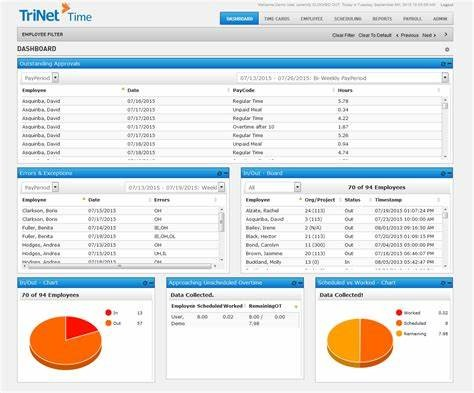
The platform automates payroll deductions for benefits contributions. This ensures accurate and timely processing. TriNet also assists with regulatory compliance, including ACA, HIPAA, and IRS requirements. This helps businesses navigate complex labor laws.
Why TriNet Is a Trusted PEO for Small and Mid-Sized Businesses
TriNet simplifies HR and benefits administration by managing compliance, employee benefits, and payroll under a single platform. Unlike traditional HR software, TriNet functions as a co-employer. This provides businesses with access to affordable group health insurance and other benefits that would typically be available only to larger organizations.
It supports industry-specific HR needs, making it a great fit for businesses in healthcare, finance, technology, and professional services. The platform includes workforce analytics. This helps businesses optimize their benefits offerings and track employee engagement.
TriNet‘s Benefits Administration Features and Risk Support
Complete Benefits Administration
TriNet offers access to group health insurance, dental, vision, 401(k) plans, wellness programs, and employee assistance programs.
Automated Payroll and Benefits Synchronization
Payroll deductions for health insurance, retirement contributions, and other benefits are calculated and processed automatically.
Industry-Specific HR Support
TriNet tailors its services to businesses in industries such as healthcare, finance, technology, and professional services.
Risk and Compliance Management
TriNet helps businesses mitigate legal risks with HR support, labor law compliance, and risk management solutions.
TriNet Integrations: Accounting, HR, and Insurance Providers
TriNet integrates with payroll, accounting, and HR software to simplify administrative processes.
- Payroll & Accounting Integrations – QuickBooks, Xero, NetSuite
- Benefits & Insurance Providers – Aetna, Blue Cross Blue Shield, MetLife, Kaiser Permanente
- Compliance & Tax Solutions – ACA Reporting, IRS, E-Verify
Who Uses TriNet? Common Industries and Company Types
TriNet is used by small and mid-sized businesses that need a full-service HR and benefits administration solution. It is especially beneficial for companies looking to outsource HR functions while maintaining high-quality employee benefits.
Businesses in professional services, healthcare, finance, and technology industries often rely on TriNet for compliance management and workforce support.
TriNet Pros and Cons: Full Breakdown for 2026
@import url(‘https://fonts.googleapis.com/css2?family=Poppins:wght@300;400;600&display=swap’);
| Pros | Cons |
|---|---|
| PEO services provide access to enterprise-level benefits | Pricing is higher than standalone HR platforms |
| Automated payroll and benefits administration | Less flexibility for businesses that prefer full HR control |
| Compliance support for ACA, HIPAA, and IRS regulations | Custom pricing makes it hard to compare costs upfront |
| Employee self-service portal for benefits enrollment | |
| Industry-specific HR and risk management support |
Final Verdict: Is TriNet the Right PEO Solution for You?
TriNet is a great solution for businesses that need a PEO service to handle HR, payroll, and benefits administration while ensuring compliance. Offering access to affordable group health plans, automated payroll deductions, and compliance management helps businesses simplify HR operations and provide competitive employee benefits.
While the cost may be higher than traditional HR software, TriNet remains a strong choice for businesses that want a full-service HR solution without managing administrative tasks in-house.
Namely : Best Benefits Administration Software for Mid-Sized Businesses

Namely
- Pricing: Starts at $12 per employee/month
- Spot Score: 9.7
- Best For: Mid-sized businesses
Who Should Use Namely for Benefits Management?
Mid-sized businesses looking for an intuitive benefits administration platform with integrated payroll, HR, and compliance tools. It is ideal for companies that need a flexible solution to manage health insurance, retirement plans, and employee wellness programs while ensuring regulatory compliance.
Namely Pricing: Plans, Features, and Add-On Costs
Namely offers custom pricing based on company size, selected features, and industry requirements.
- Core HR Plan – Custom pricing (Includes employee records, time tracking, and reporting)
- HR & Payroll Plan – Custom pricing (Adds payroll processing, tax filing, and direct deposit)
- HR, Payroll & Benefits Plan – Custom pricing (Includes benefits administration, compliance tools, and third-party integrations)
- Add-ons – Performance management, recruiting tools, and compliance services available for additional fees
Pricing depends on the number of employees and the level of functionality required.
Namely Overview: All-in-One HR and Benefits Administration
Namely is an all-in-one HR platform that simplifies benefits administration, payroll processing, and compliance management for mid-sized businesses. The system provides a easy-to-use interface where HR teams can manage open enrollment, track benefits costs, and integrate with third-party benefits providers.
The platform automates payroll deductions for health insurance and retirement contributions. This reduces administrative workload. Employees can access a self-service portal to enroll in benefits, update their selections, and view coverage details. Namely also includes compliance support, helping businesses navigate ACA, HIPAA, and IRS regulations.
Why Namely Is Known for Mid-Sized Businesses
Namely, it provides a flexible and easy-to-use benefits administration platform tailored to the needs of mid-sized businesses. Unlike traditional enterprise HR solutions, it offers a more intuitive experience with customizable benefits packages and smooth payroll integration.
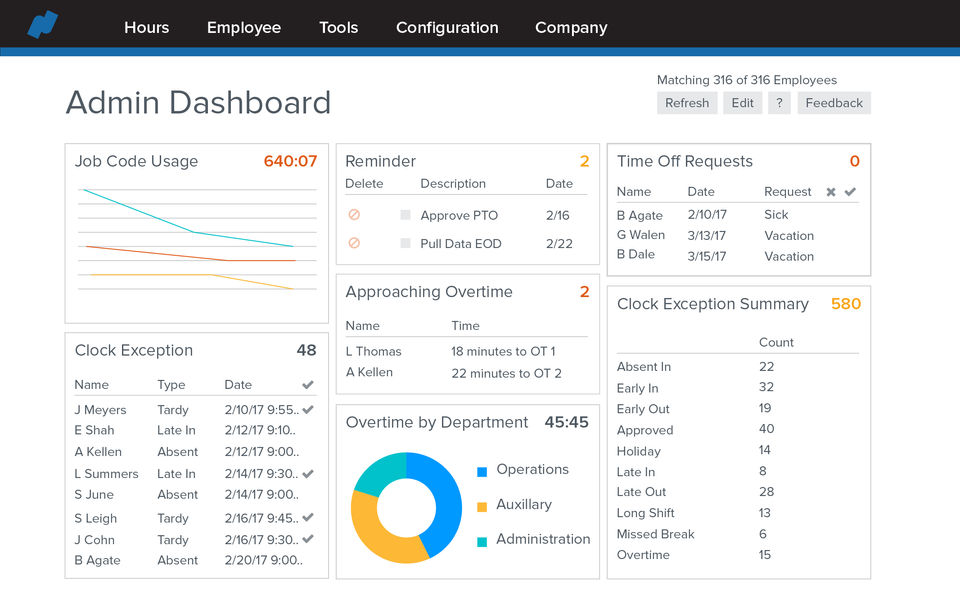
Namely also enhances the employee experience by offering a modern self-service benefits portal. Employees can compare benefits plans, estimate costs, and make informed decisions about their coverage. The platform integrates with major insurance providers. This makes benefits enrollment and management easier for HR teams.
Top Features of Namely for Benefits and Payroll Integration
Automated Benefits Enrollment and Payroll Integration
Benefits selections sync directly with payroll. This ensures accurate deductions and contribution tracking.
Compliance Management for ACA, HIPAA, and IRS
Namely provides real-time compliance tracking and generates required reports to help businesses meet regulatory obligations.
Third-Party Benefits Provider Integrations
Namely connects with major insurance carriers. This simplifies benefits administration and claims processing.
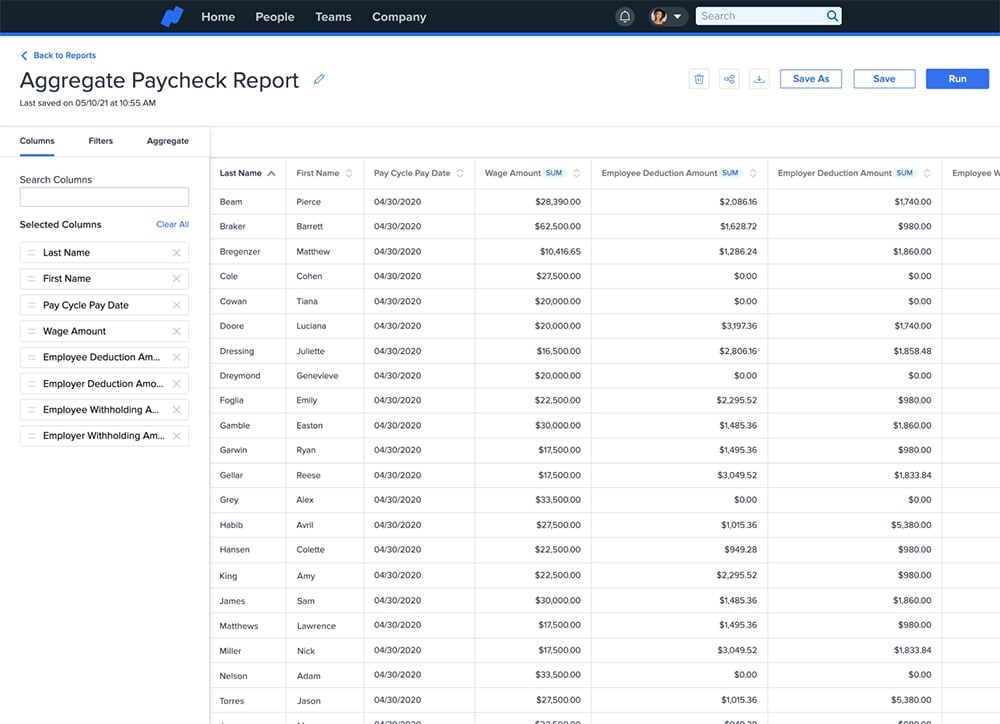
HR Analytics and Benefits Reporting
HR teams can generate detailed reports on benefits costs, employee participation, and overall benefits utilization.
Namely Integrations with Payroll, HR, and Insurance Systems
Namely integrates with payroll, HR, and compliance tools to create a smooth experience for HR teams.
- Payroll & Accounting Integrations – QuickBooks, NetSuite, ADP
- Benefits & Insurance Providers – Aetna, Cigna, Blue Cross Blue Shield, Guardian
- Compliance & Reporting Solutions – ACA Reporting, IRS, E-Verify
Who Uses Namely? Ideal Business Types and Industries
Namely, it is widely used by mid-sized businesses across industries such as professional services, technology, healthcare, and retail. It is a popular choice for companies that need a easy-to-use HR platform with integrated benefits administration and payroll processing.
Namely Pros and Cons for Benefits Administration
@import url(‘https://fonts.googleapis.com/css2?family=Poppins:wght@300;400;600&display=swap’);
| Pros | Cons |
|---|---|
| Customizable benefits administration for mid-sized businesses | Pricing may be high for smaller businesses |
| Smooth payroll and benefits synchronization | Some advanced reporting features require add-ons |
| Compliance support for ACA, HIPAA, and IRS regulations | Limited customization for larger enterprise businesses |
| Employee self-service portal for benefits enrollment | |
| Easy-to-use interface with modern design |
Final Verdict: Is Namely the Right Benefits Platform for Your Business?
Namely is a strong choice for mid-sized businesses that need an intuitive, customizable benefits administration platform with integrated HR and payroll solutions. It simplifies open enrollment, compliance tracking, and benefits reporting. This makes it easier for HR teams to manage employee benefits efficiently.
The self-service portal enhances the employee experience by allowing individuals to enroll in benefits, compare plans, and access key benefits information in one place. With smooth payroll integration, businesses can ensure that deductions and contributions are accurately processed. This reduces administrative workload.
