
Cross-functional hiring plays a big role in building well-rounded teams, especially for roles that need input from multiple departments. Whether it’s HR, tech leads, or sales managers, everyone needs a clear way to collaborate during the hiring process — without that shared process, feedback ends up scattered across inboxes and nobody has the full picture. That’s where purpose-built tools come in.
These platforms make it easier to manage candidate pipelines, share feedback, and align on decisions without the usual back-and-forth. If you’re looking to cut friction and bring structure to team-based hiring, the right software can make a real difference to how quickly a role gets filled and how confident everyone feels about the final decision. This guide covers tools designed to simplify cross-functional hiring and support faster, more informed decisions.
What You’ll Learn About Cross-Functional Hiring Tools
If you’re evaluating tools to improve cross-functional hiring, this guide covers what you need to make an informed decision. Here’s what you’ll find:
- Which roles and teams benefit most from cross-functional hiring tools
- A simple breakdown of how multi-department hiring works and why it matters
- Real-world issues companies face when managing hiring across departments manually
- Key functionalities that simplify collaboration, scheduling, and evaluation
- A curated list of platforms built to support collaborative hiring, along with their use cases
- Scenarios like product, sales, and customer success hiring, where these tools shine
- Quick pricing snapshots and availability of demos or free trials
- Step-by-step advice for rolling out a tool across departments with minimal friction
Who Should Use Cross-Functional Hiring Software
This guide is for teams looking to bring more clarity and structure to cross-functional hiring. Whether you’re managing multiple open roles or coordinating across departments, the right tools can make your hiring process faster and more effective, and cut down on the coordination overhead that tends to build up as more people get involved.
HR Managers
Professionals overseeing recruitment across departments need visibility, coordination, and consistent hiring workflows to manage multiple stakeholders efficiently.
Department Heads & Team Leads
Those actively involved in candidate interviews and evaluation want tools that simplify communication and keep feedback organized across teams.
Startups & Mid-Sized Companies
Growing teams scaling their hiring efforts across roles like product, sales, and operations need software that supports speed without sacrificing structure.
Companies Shifting to Collaborative Hiring
Organizations moving from siloed decision-making to structured, team-based hiring are looking for tools that support feedback loops, transparency, and alignment across functions.
What Is Cross-Functional Hiring? (+ Common Roles Involved)
💼 What is Cross-Functional Hiring?
Cross-functional hiring involves HR, engineering, and other teams jointly evaluating candidates to ensure shared decision-making.
Common Use Cases
- Product Managers – touch multiple teams
- Team Leads – influence company strategy
- Customer Success – coordinate across functions
🎯 Why It Matters
- Brings diverse perspectives
- Reduces decision-making bias
- Improves alignment across teams
Cross-functional hiring is the process of bringing people from different departments — HR, engineering, marketing, sales — into evaluating and selecting candidates. Instead of the decision resting with one person or team, it becomes a shared effort, with each department weighing in on the parts of the role they understand best.
This approach works especially well for roles that touch multiple parts of the business. Think product managers, department heads, or customer success leads — positions where team collaboration is built into the job itself. In these cases, having multiple teams weigh in on the right fit makes sense.
The goal is better hiring decisions, by bringing in DEI capabilities and the right software to make that collaboration smooth, timely, and transparent — instead of a process that quietly stalls because one department’s feedback never made it to the rest of the group.
Challenges of Cross-Functional Hiring Without the Right Tools
Cross-functional hiring sounds efficient in theory, but without dedicated tools, it often creates more confusion than clarity. Here’s where teams commonly hit friction:
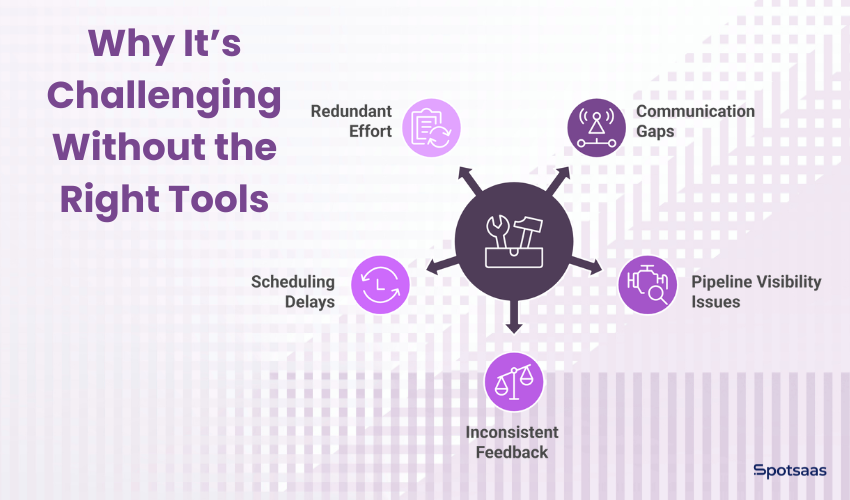
Problem #1: Communication Gaps During Team-Based Hiring
Without a shared platform, communication tends to happen across scattered channels — email threads, spreadsheets, internal chats. That makes it easy to miss updates or lose track of key decisions, especially once more than two or three people are weighing in on the same candidate.
When hiring spans multiple departments, even a minor miscommunication can delay the whole process.
Problem #2: Lack of Real-Time Candidate Pipeline Visibility
Without real-time visibility, team members are often unsure where a candidate stands. Is the resume reviewed? Has the interview been scheduled? Who’s responsible for the next step?
Those questions stay unanswered without a unified view of the pipeline.
Problem #3: Inconsistent Feedback Across Teams During Hiring
When each department uses its own format or criteria to evaluate candidates, comparing input or reaching an objective decision gets difficult. One team might rate on a 1-5 scale while another writes free-form notes, and reconciling the two isn’t straightforward. That inconsistency can drag out discussions or lead to misaligned hires, especially in cross-functional roles that depend on diverse input.
Problem #4: Interview Scheduling Delays Across Departments
Coordinating interviews across departments is a logistical hurdle, especially once you’re trying to line up calendars across four or five interviewers at once. Without built-in scheduling tools, teams end up in long back-and-forth email chains trying to find overlapping availability, which adds delays and can hurt the candidate’s impression of the company.
Problem #5: Repetitive Hiring Tasks and Manual Workload
Without automation, many hiring tasks get repeated across functions. Different teams might review the same resume separately or update status sheets by hand, duplicating work that a shared system would only need done once. That duplication wastes time and raises the chance of errors.
Key Features to Look for in Cross-Functional Hiring Software
Choosing the right software for cross-functional hiring comes down to features that promote clarity, speed, and collaboration. Here are the must-haves to look for:
| Feature | Description |
|---|---|
| Role-Based Access | Controls who sees what—HR, leads, and managers only access what they need. |
| Centralized Profiles | Keeps all resumes, notes, and updates in one shared view. |
| Scorecards | Aligns feedback across teams using a single evaluation format. |
| Scheduling Tools | Reduces delays by simplifying time slot coordination. |
| Slack/Email Sync | Sends updates through tools your team already uses. |
| Custom Workflows | Flexible stages tailored to each team’s hiring process. |
- Role-based access control matters when multiple stakeholders are involved. It makes sure each user — HR, a department lead, an interviewer — only sees what’s relevant to them, which cuts clutter and keeps data private.
- Centralized candidate profiles bring everything together — resumes, interview notes, feedback, communication history — in one place. When every team member sees the same information, there’s less room for misunderstandings or repeated questions.
- Collaborative scorecards standardize how feedback gets collected across departments. Everyone evaluates candidates against the same criteria, which makes it easier to compare notes and reach a decision without long debates.
- Built-in interview scheduling cuts out a lot of coordination pain. Instead of endless email chains or calendar clashes, teams and candidates can book slots that work for everyone.
- Slack and email integration keeps people connected without logging into the platform constantly — notifications, reminders, and status updates flow into the tools teams already use.
- Custom hiring workflows matter for teams with different processes. Whether sales runs a three-stage interview or engineering leans on technical assessments, a flexible tool can handle both without forcing every team into the same mold.
Top Software Platforms for Cross-Functional Hiring in 2026
Cross-functional hiring requires tools that bring HR teams, department leads, and interviewers together in one simplified system. The platforms below are built to support collaborative decision-making while cutting delays and manual work.
Ashby: Best for High-Growth Startups and Scaling Hiring Teams
Ashby
- Spot Score – 8
- Best For: High-growth startups and scaling teams seeking AI-powered automation
- Pricing: Starts from $360/month
Ashby is a powerful applicant tracking system that caters especially well to high-growth companies. Its strength is in advanced analytics, structured interview workflows, and customizable scorecards. Each stakeholder can view performance metrics, candidate progress, and team feedback — all from one interface, without needing a separate spreadsheet to track where things stand.
Ashby also is known for automating repetitive hiring tasks without giving up visibility or control.
Best for: Startups and scaling teams that want data-backed decisions and tight coordination across hiring stages.
Workable: Best for Small to Mid-Sized Cross-Functional Hiring

Workable
- Spot Score 9.6
- Best For: Small to Mid-Sized Business
- Pricing: Starts from 169/month
Workable is known for being easy to use and quick to set up, which matters for teams that don’t have a dedicated recruiting ops person to manage a more complex system. It supports multiple hiring roles, so recruiters, HR managers, and department leads can collaborate in a shared environment. The platform offers centralized feedback, built-in interview kits, and automated candidate communications, plus a mobile-friendly interface that keeps busy teams updated on the go.
Best for: Small to mid-sized companies that want a straightforward solution for cross-team hiring without a steep learning curve.
Recruitee: Best Visual Pipeline Tool for Collaborative Hiring
Recruitee
- Spot Score 9.3
- Best For: Collaborative hiring teams and growing businesses
- Pricing: Starts from 270/month
Recruitee offers a drag-and-drop hiring pipeline that suits visual thinkers well — you can see exactly where every candidate sits at a glance, instead of digging through a list. It’s built for teams that want to co-manage hiring without leaning heavily on email or spreadsheets. Built-in team mentions, shared notes, and role-specific permissions make it easy for departments to work together, with customizable pipelines for different roles.
Best for: Teams that prefer a visual, hands-on approach to managing multiple roles and want collaboration at every step.
Greenhouse: Ideal for Mid to Large Businesses With Structured Hiring Needs

Greenhouse
- Spot Score: 9.4
- Pricing: Custom pricing
- Best For: Mid to Large Business
Greenhouse is an enterprise-grade hiring platform built for companies with structured, process-driven recruitment strategies. It enables standardized scorecards, consistent interview plans, and clear role assignments, which matters more once a company has dozens of hiring managers running interviews at the same time. Built-in interviewer training and reporting tools help larger organizations keep every department aligned and every decision backed by data.
Best for: Mid-sized to large organizations with well-defined hiring practices that need control, accountability, and cross-team alignment.
Lever: Best for Unified CRM and Collaborative ATS Features
Lever
- Spot Score: 8.9
- Pricing: Starts at $3,500/year
- Best For: Mid to Large Business
Lever combines CRM and ATS features in one platform. This makes it easier to manage both outreach and applicant tracking without switching between two separate systems. Its collaborative hiring tools include real-time feedback, unified candidate profiles, and shared communication threads, so everyone involved — from HR to team leads — sees where a candidate stands.
Best for: Companies that want to centralize communication and cut down redundancy across hiring teams.
Confused about Greenhouse vs Lever? Read this blog on Greenhouse vs Lever: Which Grows Better With Your Team?
Pricing Overview and Free Trials of Cross-Functional Hiring Tools
| Tool | Starting Price | Free Trial/Demo | Pricing Model |
|---|---|---|---|
| Ashby | $360/month | Demo available | Quoted per usage |
| Workable | $249/month | 15-day free trial | Flat monthly fee |
| Recruitee | $216/month | 18-day free trial | Account-based |
| Greenhouse | Custom quote | Demo available | Annual subscription |
| Lever | $3500/year | Demo on request | Annual plan |
Pricing shown is approximate; check vendor websites for current rates.
Best Use Cases for Cross-Functional Hiring Software
Cross-functional hiring tools matter most in roles that sit at the intersection of multiple departments. These roles need alignment across teams from the very beginning — exactly where collaborative hiring platforms make a difference, since misalignment early on is much harder to fix once an offer is already on the table.
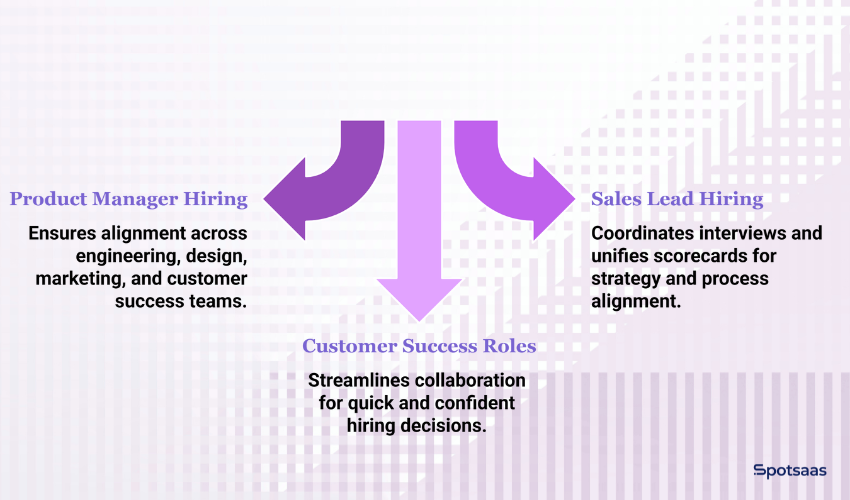
Cross-Functional Hiring for Product Manager Roles
Hiring a product manager usually pulls in several departments — engineering, design, marketing, sometimes customer success — each assessing something different: technical understanding, user-centric thinking, business alignment. No single interviewer can reasonably judge all three.
A collaborative hiring tool makes sure everyone shares feedback in one place, sees the same candidate data, and stays informed throughout the process, not piecing together five different opinions after the fact.
Collaborative Hiring Needs for Sales Leader Positions
When bringing in a sales leader, HR may handle initial sourcing while regional heads assess strategy fit and operations checks for alignment with internal processes. Each group is looking at a different slice of the same hire. Without the right tool, that level of involvement often leads to disconnected conversations.
A centralized system helps coordinate interviews, unify scorecards, and keep hiring momentum steady.
Hiring Customer Success Roles with Cross-Department Collaboration
Customer-facing roles like onboarding specialists or customer success managers depend heavily on cross-department input. Product teams evaluate technical aptitude, support teams look for communication skills, operations want process fit — three very different lenses on the same candidate.
These tools simplify that collaboration, so hiring decisions get made quickly and confidently, without the repetitive feedback cycles that come from chasing three separate opinions by email.
Here is your Buying Checklist: Choosing the Right Cross-Functional Hiring Tool presented in a clean, structured hiring format — useful for blog insertion, downloadable assets, or internal evaluations.
Cross-Functional Hiring Tool Buyer’s Checklist
Use this checklist to evaluate and compare platforms as you explore cross-functional hiring tools.
Core Features to Evaluate in Cross-Functional Hiring Tools
- Role-based access for HR, managers, and interviewers
- Centralized candidate profiles (resumes, notes, status updates)
- Collaborative scorecards for fair, consistent evaluations
- Integrated smart scheduling
- Real-time notifications via email or Slack
- Custom workflows to match departmental hiring styles
Ease of Use for Cross-Team Hiring Software
- Designed for both HR and non-HR users (team leads, engineers, etc.)
- Quick setup and onboarding support
- Mobile-responsive for reviewing candidates on the go
Collaboration Features That Support Multi-Team Hiring
- Shared feedback tools accessible to all departments
- Internal notes, @mentions, and tagging options
- Dashboards or weekly digests for candidate status visibility
Integration & Compatibility for HRIS, Calendars, and Tools
- Compatible with your current HRIS or ATS
- Google/Outlook calendar integration
- Works with Zoom, Microsoft Teams, and Slack
Support and Scalability Features for Growing Teams
- Live chat, email, or phone support is available
- Designed to scale as hiring volume grows
- Reporting and analytics for pipeline tracking
Pricing Models and Free Trial Options by Platform
- Free trial or demo offered
- Transparent pricing or a tailored quote
- Flexible billing model (per user, flat rate, or usage-based)
How to Roll Out Cross-Functional Hiring Tools Across Departments
Rolling out a hiring platform across multiple teams isn’t just about onboarding — it’s about building a process that works for everyone involved, from a recruiter logging in daily to a hiring manager who only touches the tool once a quarter. Whether you’re scaling fast or fixing an existing system, these steps help make the rollout smooth.
| Step | What to Do |
|---|---|
| 1. Assign Tool Champions | Pick one contact per team to guide usage and share feedback. |
| 2. Start Small | Test the tool with one open role before scaling. |
| 3. Use Templates | Create scorecards and feedback forms for consistency. |
| 4. Hold Weekly Syncs | Keep teams aligned with short, regular check-ins. |
| 5. Track and Adapt | Collect input and refine workflows as you go. |
Appoint a Hiring Tool Champion in Each Department
Designate one person in every department as the primary point of contact for the tool. This person will:
- Help team members learn the platform
- Feed back to HR or the vendor
- Encourage consistent use across their team
Having a champion cuts down confusion and helps maintain accountability during adoption, especially in the first few weeks after rollout.
Start with One Open Role
Begin by testing the tool on one active, cross-functional role. That lets you:
- Watch how different teams interact with the platform
- Spot early challenges
- Refine workflows before scaling company-wide
Starting small helps teams build confidence without feeling overwhelmed early on.
Use Templates for Scorecards and Feedback
Consistency matters when multiple departments are involved. Create templates for:
- Interview feedback
- Candidate evaluations
- Screening questions
Standard templates save time and make everyone’s input easier to compare.
Set Weekly Syncs for Collaborative Reviews
Short, recurring syncs keep hiring teams aligned. These check-ins are useful for:
- Reviewing candidate progress
- Sharing feedback
- Unblocking next steps
Even a 20-minute weekly call can prevent delays and improve decision-making across departments.
Monitor Progress and Iterate
After launch, keep an eye on how teams are using the tool. Collect input regularly and be ready to:
- Adjust workflows
- Reassign permissions
- Provide refresher guidance if needed
Iterating based on feedback drives long-term success and stronger team adoption.
Final Thoughts: Choosing the Best Tool for Cross-Functional Hiring
Cross-functional hiring is no longer optional — it’s a necessity for modern teams building roles that span multiple departments. But without the right tools, the process can easily turn slow, scattered, and frustrating.
The platforms covered in this guide are built to remove those roadblocks. From aligned scorecards to shared visibility and simplified scheduling, they give teams the structure and flexibility to collaborate efficiently, instead of reinventing the process for every new role.
If you’re hiring across product, sales, engineering, or support, these tools can help unify your process, improve candidate experience, and cut time-to-hire. The key is to start small, bring in the right people early, and grow adoption one step at a time instead of rolling everything out to every department at once.
Choosing the right solution today sets the foundation for more efficient, confident hiring tomorrow, and saves you from re-evaluating tools again in another six months. Browse our detailed software listings to see real user reviews, pricing breakdowns, and key features.
Explore Top-Rated ATS Tools on Spotsaas
Not sure which one suits your workflow?
Schedule a free consultation with our software advisors and get personalized recommendations for your agency.
FAQs About Cross-Functional Hiring Platforms
Can multiple departments use the same hiring tool simultaneously?
Yes, most tools support role-based access so different teams can collaborate seamlessly.
Do these tools integrate with calendars and HR systems?
Absolutely—many offer integrations with calendars, HRIS platforms, and communication tools.
Is training required to use these platforms?
Most tools are user-friendly and require minimal onboarding for non-HR team members.
How is feedback shared across teams?
Feedback is collected through shared scorecards and comments and is visible to authorized users.
Are these platforms suitable for remote or hybrid teams?
Yes, they’re designed to support remote collaboration, including virtual interviews and async reviews.
