
Staying compliant with labor laws keeps getting harder as leave regulations shift and vary from one region to the next. When tracking is done by hand, details get missed and HR teams end up doing extra work to catch up.
Absence management software addresses that by automating policy checks, leave tracking, and documentation, so every request gets measured against current law without someone manually updating the rules each time. For businesses trying to avoid risk and keep processes running smoothly, that kind of automation pays for itself.
What This Compliance Guide Covers
This guide covers:
- Common compliance challenges in absence tracking
- How software supports labor law compliance
- Legal and operational benefits for HR teams
- The cost of non-compliance for growing businesses
- Key features to look for in a compliance-ready solution
Top Compliance Challenges in Absence Management
Handling employee absences takes more than marking a calendar. For companies working across different regions or industries, staying compliant with labor regulations is a core part of workforce management. Here’s a look at the challenges businesses run into most often when leave tracking isn’t automated or centralized:
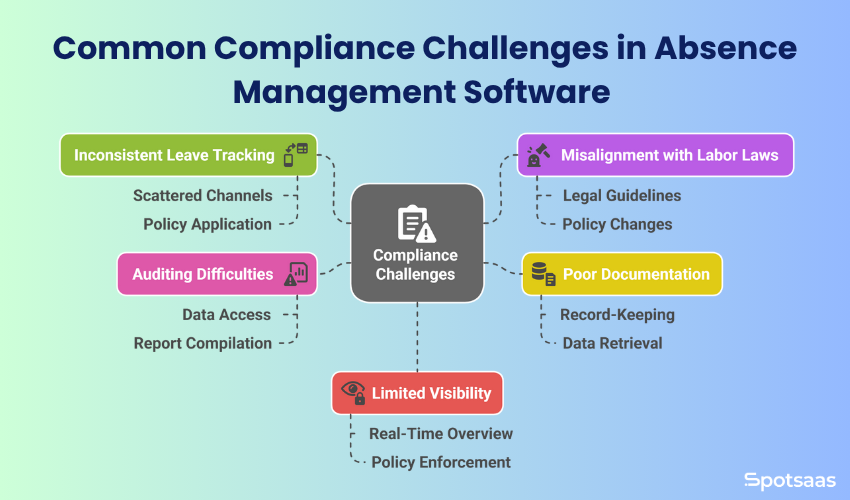
Issue #1: Inconsistent Leave Tracking Across Teams
In a lot of companies, leave requests still arrive through scattered channels: email, spreadsheets, sometimes even handwritten forms. Without one unified system, HR teams end up applying policy inconsistently, one employee’s leave gets logged properly while another’s slips through entirely. That lack of structure tends to produce misunderstandings, unapproved absences, or scheduling conflicts.
Issue #2: Manual Errors and Labor Law Misalignment
Federal and state laws set specific guidelines on leave types, eligibility, and required documentation. The FMLA, for instance, requires employers to provide up to 12 weeks of unpaid, job-protected leave for certain health or family reasons. Get these details wrong and companies risk legal and operational trouble, and HR teams managing policy by hand often struggle to keep up with frequent changes, especially once multiple states or countries are involved.
Issue #3: Incomplete or Disorganized Leave Documentation
Documentation is more than record-keeping, it’s the company’s safety net. Clear records of every leave request, approval, and medical note matter most during disputes, audits, or internal reviews, but when that data lives in different folders or physical files, pulling it quickly becomes its own project. Missing details slow down resolution and can also raise questions about whether the process was fair or compliant to begin with.
Issue #4: Audit Preparation Challenges with Manual Systems
Audits, internal or external, require fast access to historical data. HR teams need to show that policies were applied fairly, consistently, and in line with legal requirements, and when data is scattered across systems or stuck in outdated formats, compiling an accurate report turns into a time-consuming task. That fragmentation also raises the odds of errors, missed entries, or duplicate records.
Issue #5: Lack of Centralized Visibility Across Teams and Locations
Companies with remote teams, multiple offices, or international branches tend to run into visibility gaps. Without one central platform, there’s no real-time view of leave activity across the organization, which makes it hard to plan workloads, balance staffing, or apply policy enforcement evenly across every team. Managers can end up approving time off without realizing it overlaps with another key team member’s absence.
How Absence Management Software Solves Compliance Challenges
For HR teams handling dozens, or even hundreds, of leave requests a month, manual tracking simply doesn’t scale. That’s where absence management software earns its place: these tools are built to cut down human error, bring consistency to leave processes, and, most importantly, keep businesses aligned with labor law across regions.
| Feature | How It Helps |
|---|---|
| Centralized Leave Requests and Approvals | Streamlines submissions through self-service portals and real-time manager alerts, reducing confusion and delays. |
| Automated Policy Checks | Enforces company rules and regional labor laws automatically, ensuring fair, legal, and consistent approvals. |
| Secure, Organized Documentation | Stores all leave records and documents in one place with timestamps, ensuring easy access for audits and reviews. |
| Real-Time Dashboards and Team Visibility | Provides centralized visibility of all team absences for better planning and schedule coordination. |
| Compliance-Focused Reporting and Audit Trails | Generates ready-to-use reports and maintains transparent logs of all leave activity for internal and legal audits. |
| Multi-Region and Multi-Policy Support | Applies region-specific rules automatically, helping companies operate across locations without manual intervention. |
Here’s a closer look at how it addresses each of the challenges covered above:
Centralized Leave Requests and Approvals
Centralization is one of the most immediate benefits. Employees submit time-off requests through a self-service portal instead of trading emails or filling out paper forms, and managers get real-time alerts, review requests against team calendars and current workloads, and approve or decline with full visibility into the decision. That combination cuts out confusion and keeps everyone working from the same information.
Automated Policy Checks
The software enforces whatever leave rules the organization has set, accrual limits, blackout dates, eligibility periods, and applies them alongside federal or regional compliance regulations like the FMLA or ADA. If an employee requests medical leave, for example, the system can check automatically whether they meet the minimum service period the law requires and walk HR through the next steps.
Secure, Organized Documentation
Every leave request gets recorded with a timestamp, approval details, and any attached documentation, like a doctor’s note. Storing those records securely in one place makes them easy to pull up during audits or internal reviews, which removes the need for manual filing and cuts the risk of missing paperwork when compliance checks come around.
Real-Time Dashboards and Team Visibility
HR managers and team leads can see all upcoming, current, and past absences through one centralized dashboard. That real-time visibility supports better planning, helps avoid scheduling overlap, and keeps leave distributed fairly across departments, which matters even more for distributed or global teams trying to stay operationally balanced.
Compliance-Focused Reporting and Audit Trails
Audit preparation gets faster and more reliable as a result. A few clicks generate reports on leave usage, department-level trends, or records for a specific employee, and some platforms build in audit trails that show every action taken on a request, giving full transparency into who did what and when.
Multi-Region and Multi-Policy Support
Labor laws can differ significantly for companies operating across multiple countries or states. Advanced absence software applies region-specific rules automatically based on where an employee is located, so a team in California gets different leave entitlements than one in New York or Europe, without HR having to intervene manually.
Replacing manual processes with this kind of automation lets businesses move faster, stay accurate, and take administrative burden off HR. More importantly, it helps companies avoid legal issues by keeping pace with the most current labor policies.
Legal Benefits of Absence Software Built for Compliance
Keeping up with labor regulations is an ongoing job for HR teams, more so for businesses operating across multiple states or countries. A single mistake in leave approval or documentation can open the door to complications, which is exactly where absence management software earns its keep. It functions as a compliance safety net, keeping companies protected while helping them maintain fair workplace practices.
| Compliance Benefit | How It Helps |
|---|---|
| Reduced Risk of Violations | Automatically enforces leave laws like FMLA and ADA, reducing manual errors and non-compliant approvals. |
| Centralized Record-Keeping | Keeps time-stamped leave logs and documents in one place, supporting legal clarity during claims or reviews. |
| Easier Audit Preparation | Generates on-demand reports for audits, saving time and showing structured compliance readiness. |
| Consistent Policy Enforcement | Applies the same leave rules across departments, reducing confusion and helping avoid legal disputes. |
| Multi-Region Compliance Support | Automatically adjusts leave rules based on employee location, keeping multi-state and global teams compliant. |
Benefit #1: Automated Labor Law Compliance Reduces Violation Risk
Compliance-focused software comes with built-in rules aligned to laws like FMLA, ADA, and state-specific regulations, so HR teams aren’t manually cross-checking eligibility, duration, or documentation for every leave type. The system handles the calculations and alerts, which cuts the risk of approving leave that doesn’t actually meet legal criteria.
That matters most in fast-moving environments, where HR professionals don’t always have time to check every detail by hand. With automation doing that work, the error rate drops considerably.
Benefit #2: Centralized, Time-Stamped Leave Record Management
Accurate records matter most when responding to claims or inquiries. The software logs every action automatically: when a request was submitted, who approved it, what documents were attached, and when the employee returned, and organizes those logs with timestamps so they’re easy to pull up later.
When a dispute or investigation comes up, having a clear, digitally-backed timeline can make a real difference, removing ambiguity and adding clarity to internal decisions.
Benefit #3: Faster, More Accurate Audit Preparation
When an auditor or compliance officer asks for specific data, spending hours assembling spreadsheets or digging through shared drives isn’t a good use of anyone’s time. Reporting tools built into absence software generate reports instantly by date range, department, leave type, or individual employee instead.
That speeds up audits, improves accuracy, and shows regulators that the business runs on reliable systems rather than improvised ones.
Benefit #4: Enforcing Leave Policies Fairly Across All Departments
Inconsistent leave practices are one of the most overlooked legal risks a company can carry. When different teams apply policy differently, it creates confusion and opens the door to legal claims. Absence management software closes that gap by enforcing the same rules for everyone, every time.
Employees notice that consistency too, and it builds trust while cutting down on disputes and misunderstandings.
Compliance Across Jurisdictions
Compliance gets tricky fast for businesses operating across multiple states, or globally. A leave policy that works in one state might not hold up elsewhere, and while some countries mandate parental leave, others don’t. Software that supports multi-region rules makes managing that patchwork far easier.
It detects where an employee is based and applies the correct rules automatically, so HR stays compliant without constantly researching laws or hand-adjusting spreadsheets.
Who Should Use Compliance-Focused Absence Management Software
Absence management software makes sense for any business that wants to streamline time-off tracking, stay legally compliant, and cut manual work. It becomes especially valuable for companies with growing teams, multiple locations, or complex leave policies.
🏢 Mid-Sized to Large Businesses
Well suited to growing companies that need organized leave workflows at scale.
🌍 Businesses Across States or Countries
Helps manage region-specific leave laws and keeps compliance consistent globally.
📋 HR Teams Managing Multiple Leave Types
Ensures each leave type is handled accurately based on eligibility and policy.
⚖️ Highly Regulated Industries
Essential for sectors like healthcare or finance that need secure, audit-ready systems.
💻 Remote and Hybrid Teams
Makes it easier to track absences across locations with real-time visibility.
Use Case: Mid to Large Businesses Needing Scalable Leave Compliance
As headcount grows, so does the complexity of managing leave. More employees means more requests, more types of time off, and a higher risk of inconsistency creeping in. Software standardizes the process and keeps things organized as the company scales.
Use Case: Companies Operating in Multiple States or Countries
Companies with teams spread across regions deal with varying labor laws and leave entitlements as a matter of course. Absence management tools that support location-based rules make local compliance manageable without adding extra work for HR.
Use Case: HR Teams Handling Complex Leave Policies
Paid time off, sick leave, parental leave, bereavement, unpaid leave: each type comes with its own set of rules. Software applies those rules accurately, based on an employee’s eligibility and the company’s specific policy.
Use Case: Compliance-Critical Industries Like Healthcare, Finance, Education
Healthcare, education, government, and finance tend to carry stricter compliance requirements. In these sectors, proper documentation and audit readiness aren’t optional, they’re essential, and absence management software gives these teams the reliability and transparency the work demands.
Remote and Hybrid Teams
Once employees are working from a mix of locations, tracking absences through spreadsheets or calendars stops being practical. A digital platform pulls everything into one system, giving HR and managers real-time visibility no matter where the team is based.
Cost of Non-Compliance
Plenty of businesses don’t realize how much inconsistent or manual absence tracking can cost them until it’s too late. Non-compliance isn’t always deliberate, but it still affects operations, finances, and team morale. Here’s what’s actually at stake when time-off policies aren’t managed properly.
Financial Penalties That Add Up
Compliance laws get updated at the state, federal, and sometimes local level, and missing a single change, like an updated sick leave policy or family medical leave regulation, can result in fines ranging from hundreds to tens of thousands of dollars per violation. Those amounts vary by jurisdiction, but for companies with distributed teams, one mistake repeated across regions can multiply fast.
Failing to document protected leave under FMLA properly, or misclassifying a leave type, can result in financial liabilities that include back pay, interest, or administrative fines.
Risk of Legal Disputes
Employees depend on leave policies being applied clearly and fairly. If those policies get misapplied, or records don’t back up the decisions HR made, the business can end up facing disputes that require legal attention: attorneys, negotiations, third-party reviews, or court proceedings, all of which cost time and money.
Even a claim that’s eventually resolved in the company’s favor can drag on and create stress along the way, denting both employee confidence and internal workflows.
Time Lost on Manual Corrections
Without an automated system, HR teams often spend hours, sometimes days, fixing errors, digging up old records, or validating leave balances. That pulls focus from higher-impact work like talent management, engagement, and onboarding, and over time, the hours lost to compliance admin add up to a real drag on team productivity.
Operational Delays and Scheduling Gaps
When absences aren’t tracked accurately, teams risk ending up short-staffed with no warning. That hurts output and can also drive up overtime costs, burnout, or missed deadlines, and it’s often a domino effect that starts with one missed update in a spreadsheet or calendar.
Reputation and Employee Trust
A company’s leave policy says a lot about how it treats its people. When time-off processes are inconsistent or unclear, employees end up feeling uncertain or unsupported, and over time that erodes trust, lowers morale, and can affect retention. For candidates researching a company’s culture or reviews, poor leave management can be an obvious red flag.
Keeping a reputation as a fair, organized, people-first employer means staying on top of legal obligations, and that requires tools built to support the effort.
Key Features to Look for in Compliance-Ready Absence Software
Choosing the right absence management software takes more than checking who’s on leave. What matters is finding a solution that actively supports compliance, adapts to your organization’s policies, and takes manual workload off HR.
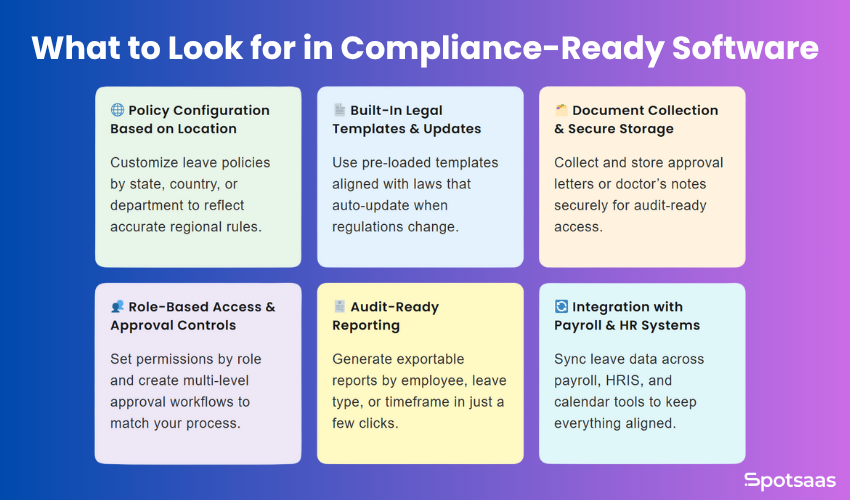
Here are the key features to look for when evaluating a compliance-ready platform:
Policy Configuration Based on Location
Look for a tool that lets you customize leave policies by region, department, or employee type. Whether you’re managing teams across states or across countries, the software should apply the correct rules based on where each employee is actually located.
Built-In Legal Templates and Law Updates
The best platforms ship with pre-set templates aligned to federal and state leave laws, and some update those templates automatically when new regulations take effect. That keeps your processes current without requiring your team to do ongoing legal research.
Document Collection and Secure Storage
Make sure the software lets employees upload the documents they need to, like medical notes or approval letters, and stores them securely in a centralized location. That matters most during audits, or if a leave decision ever gets questioned.
Role-Based Access and Approval Controls
A reliable system should support different access levels for employees, managers, and HR teams, and its approval workflows should match your internal process closely enough that no step gets skipped and every action stays traceable.
Audit-Ready Reporting
The ability to generate detailed reports, by employee, leave type, department, or time period, isn’t optional. Those reports should be easy to pull up and export, so you’re never scrambling to prepare for an internal review or external audit.
Integration with Payroll and HR Systems
To keep everything consistent, your absence tool should connect to your payroll, HRIS, and calendar systems. That avoids double data entry, cuts down on errors, and keeps time-off data flowing smoothly across every platform that needs it.
Final Thoughts: Why Labor Law Compliance Needs Absence Management Software
Managing employee absences involves more than approving time off. It means keeping the organization aligned with current labor law, staying transparent, and building a workplace employees actually trust. Manual methods may have gotten the job done in the past, but today’s compliance demands call for smarter systems.
Absence management software gives HR teams the structure and automation to stay consistent, cut admin work, and stay ahead of compliance issues. From real-time visibility to audit-ready records, it turns what used to be a complicated process into a straightforward one.
For businesses expanding across regions, managing several leave types, or simply looking to protect their people and operations, investing in the right software isn’t a luxury, it’s a step toward long-term confidence and control.
FAQs: Absence Software and Labor Law Compliance in 2026
Can absence management software help with legal compliance?
Yes, most platforms include built-in policy checks aligned with labor laws such as the FMLA, ADA, or region-specific regulations. This helps ensure that leave requests are processed fairly and legally.
How does the software handle multi-location or global teams?
Many tools support policy customization based on location. That means employees in different states or countries automatically receive leave entitlements that align with local laws.
Is the software suitable for small HR teams?
Absolutely. Even small teams benefit from automation, especially when handling multiple leave types or tracking absences across departments. It saves time and improves accuracy.
What kind of reports can I generate for audits?
You can create detailed reports showing leave history, approval trails, leave balance summaries, and documentation logs. These are helpful for both internal reviews and external audits.
Can it integrate with payroll and other HR systems?
Yes, many platforms offer integrations with payroll software, HRIS tools, and calendar systems. This helps keep all employee data in sync and reduces the need for manual updates.
