
Remote work drove a sharp jump in demand for video conferencing and web conferencing software. Companies are investing in these tools as the world adapts to new workflow requirements and employment models.
Two of the top web conferencing programs available today are Zoom and GoToWebinar. Despite looking similar, the two are not the same. Zoom is a video conferencing program, whereas GoToWebinar is a web conferencing program.
For SMEs, a lot needs to be weighed before picking a video conferencing tool: employee size, budget, and conferencing needs among them. A small team running occasional internal calls has different requirements than an SME running large webinars for prospects, and the right pick depends on which of those two use cases matters more.
First, here’s a look at both platforms individually.
What Is Zoom?
Zoom is a video conferencing tool that facilitates online communication. Most of Zoom’s clients are businesses across America, Europe, Asia, Africa, and Australia. Zoom employs about 7,000 collaborators, most of whom have sales experience and business administration diplomas.

The software is accessible from most devices and is available in Spanish, English, and other languages. For companies that value simplicity of use and the broadest range of conferencing features, Zoom is the stronger fit.
What Is GoToWebinar?
GoToWebinar is a platform for hosting online events and can be categorized as a webinar service. GoToWebinar was founded in 2006 and is based in Boston, Massachusetts, in the United States. Marketing and education professionals worldwide would be regarded as GoToWebinar’s largest client base.
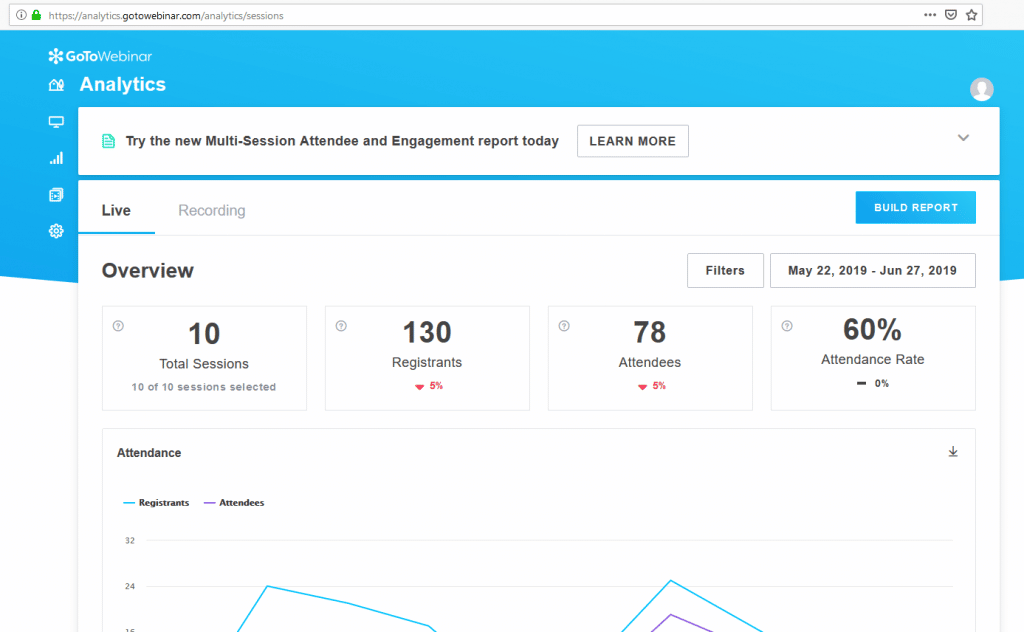
The platform offers access from any device and supports languages like French, English, Spanish, and others. Businesses with large teams that want to manage the fine display details of each meeting can use GoToWebinar.
Comparisons of Features, Integration, And Pricing
Features:
GoToWebinar users can access the platform through a mobile app or a web browser. Zoom is built primarily as a desktop application, but it can also be reached through a browser or a mobile device, which matters if your team works across a mix of laptops, tablets, and phones.
With a customized webinar channel, GoToWebinar users can give their prospects a clear sense of their brand. Conversion rates, however, can be affected by the absence of embed forms. Zoom’s registration page can be customized, but registration itself cannot be fully moderated.
GoToWebinar has a real-time engagement dashboard, polls, and surveys, so user engagement isn’t a problem, though it lacks emoji reactions. Zoom users can interact with participants through chats, polls, and Q&As, but they can’t send CTAs.
GoToWebinar also offers strong event analytics tools, though it has no tools for replay analytics — so once a session ends, digging back into how individual attendees engaged gets harder. Zoom’s analytics dashboard is useful, but it carries few, if any, automation features, meaning most of the reporting work still falls on whoever runs the account.
Integrations:
On integrations, it’s hard to find a video conferencing platform that connects with more apps than Zoom. Zoom offers more than 1,000 integrations in its Zoom App Marketplace, letting you search for an app, browse by category, or filter results. If you need to connect Zoom to your tech stack, there’s a good chance a third-party integration already exists.
GoToWebinar’s main edge over Zoom is its ability to integrate smoothly with other GoTo apps like GoToMeeting, GoToRoom, GoToConnect, OpenVoice, and more. A third-party payment gateway can also be used with GoToWebinar.
Integration is a complex topic because it calls for extra spending and third-party apps. But with the right tools in place, working remotely gets a lot easier — knowing which app pairs well with which other apps makes it simpler still, and it’s worth mapping out your existing tech stack before committing to either platform.
Pricing:
GoToWebinar doesn’t offer any free plans. Zoom offers a free plan that allows an unlimited number of meetings, with a maximum of 100 attendees and a maximum duration of 40 minutes.
GoToWebinar’s Lite plan, at $49 per month for up to 100 participants, is its most affordable option. Zoom’s Pro plan, starting at around $15 per month per user for up to 100 attendees, is its most cost-effective choice.
Medium-sized businesses on GoToWebinar can choose the Standard plan at $99 per month or the Pro plan at $199 per month. The Pro plan accommodates up to 500 guests, compared to 250 for Standard. The closest match on Zoom is the Business plan, which starts at around $20 per month.
GoToWebinar’s most expensive tier is its Enterprise plan, starting at $399 per month for up to 3,000 participants. Zoom also has an Enterprise plan, starting at $20 per user per month, supporting up to 500 event participants and including extras like unlimited cloud storage. Across every tier, the pattern holds: GoToWebinar prices by attendee capacity, while Zoom prices per user, so the better deal depends on whether your bottleneck is audience size or headcount.
Conclusion
Whichever way the choice goes between Zoom and GoToWebinar, both programs hold up well for remote work. Which app suits you best ultimately comes down to your needs and job requirements — knowing your business requirements is what makes the decision easier. Weigh the features, integrations, and pricing above against how your team actually runs meetings and webinars, and the right call becomes a lot clearer.
