
You’re not getting ignored, you’re getting blocked. Gatekeepers, whether human or automated, are trained to filter you out. The fix isn’t pushing harder, it’s going smarter. This guide covers how to reach decision-makers directly, using tools and tactics that actually work.
We’ll cover what gatekeepers do, why your outreach isn’t breaking through, and how to stand out with messaging, channels, and software that give you a real edge. If you’re serious about getting in front of the right people, here’s where to start.
Key Takeaways
- Gatekeepers exist to filter access, not to hear your pitch.
- Reaching decision-makers requires research, not just volume.
- Personalized outreach beats generic messages every time.
- Multi-channel strategies (email, LinkedIn, video) get better results.
- The right tools can help you bypass blockers and scale smartly.
What Is a Gatekeeper?
A gatekeeper is anyone or anything that controls access to a decision-maker. Their role is to screen incoming messages, calls, or requests and decide what gets passed along and what gets ignored.
In modern outreach, gatekeepers can show up in different forms:
- Executive assistants who manage calendars and filter messages
- Junior staff who field calls and emails before forwarding them
- Automated email filters that flag cold outreach as spam
- LinkedIn limitations that prevent you from messaging non-connections
- Applicant tracking systems (ATS) that block your resume from human eyes
Whether human or digital, gatekeepers exist to protect time. Unless your message feels relevant and credible, you’re likely getting filtered out. That’s true whether the filter is a person reading a subject line or an algorithm scanning for spam markers, so the same underlying test applies everywhere: does this look worth someone’s attention?
Why Gatekeepers Block You (And What That Looks Like)
Gatekeepers aren’t out to sabotage you, they’re protecting time, and they’re good at it. Whether human or automated, their job is to filter out anything that looks unimportant, unverified, or time-wasting.
If your outreach gets caught in that filter, you’ll never know it was blocked. Here’s how it happens.
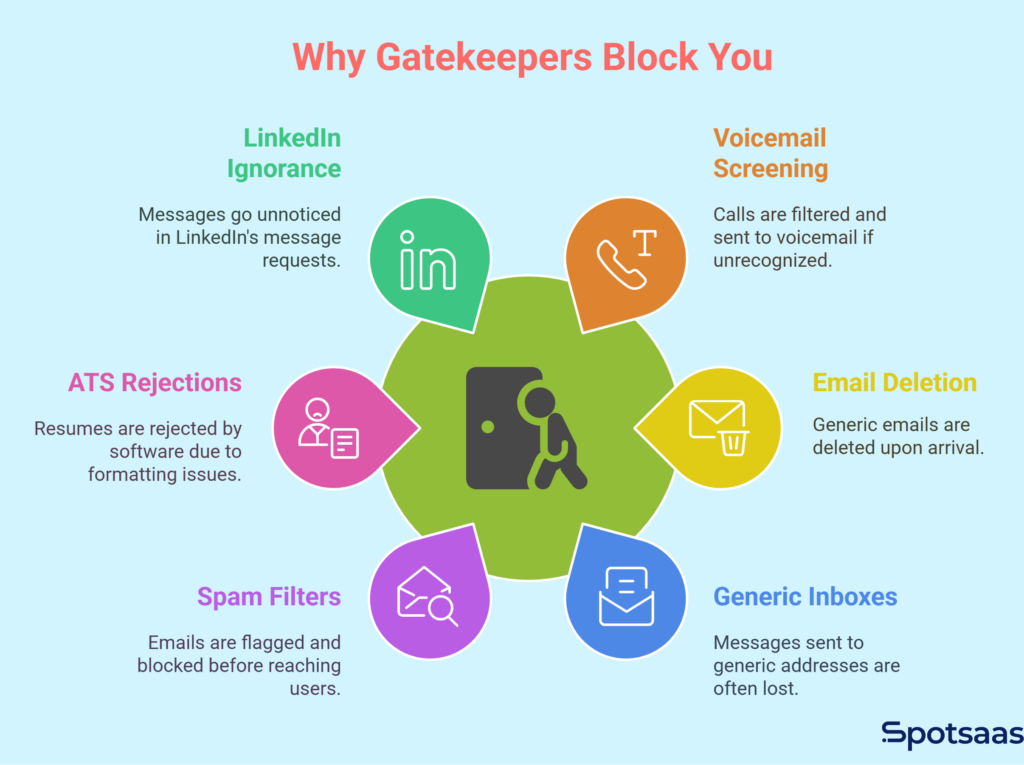
Calls Sent to Voicemail
Phone calls from unknown numbers rarely make it through. If the gatekeeper doesn’t recognize your name or company, you’re sent straight to voicemail. Assistants are trained to screen calls by asking who’s calling and why, and if your reason isn’t clear or relevant, they won’t pass you through.
Sometimes there’s no person on the other end at all, just a system set up to filter incoming calls. Cold calls with no context are easy to reject, especially when the caller sounds scripted or unsure. If you don’t sound like someone worth their time, the conversation ends before it begins.
Cold Emails Deleted on Arrival
Generic emails don’t survive long. Messages that sound templated, vague, or obviously automated are the first to go. Greetings like “Dear Sir/Madam” or “Hi there” scream mass outreach. Gatekeepers, and inbox filters, have seen every version of these.
If your message jumps straight into a pitch without showing relevance, it doesn’t get read. Decision-makers and their gatekeepers get dozens of cold emails daily. If yours doesn’t feel specific, thoughtful, and relevant, it’s deleted without a second thought.
Dumped into Generic Inboxes
Sending a message to info@ or contact@ feels like progress, but it usually isn’t. These inboxes are flooded with unfiltered communication. They may be monitored by a gatekeeper or junior staffer, but there’s rarely a process for responding.
Even if your message is forwarded, it gets buried in threads or lost in volume. Unless you’ve built rapport or named a specific person, your message will likely sit unopened until it’s automatically archived or deleted.
Flagged by Spam Filters
You might be blocked before a person even sees your message. Many companies use spam filters or AI to scan emails for promotional language and suspicious formatting. Phrases like “act now,” “free trial,” or “limited time” are easy to detect and easy to flag.
Even excessive links, attachments, or subject lines with capital letters can trigger auto-filters. If your email looks like a marketing blast or has poor formatting, it won’t land in the primary inbox. It might not even land at all.
Resumes Rejected by ATS
If you’re applying for a job, the gatekeeper might not be a person, it’s software. Applicant tracking systems (ATS) scan resumes before a recruiter sees them. If yours is missing the right keywords, or if it’s formatted in a way the software doesn’t understand, it gets filtered out automatically.
This means qualified candidates often get rejected before a human ever looks at their application. Without optimization for these systems, you’re invisible to the people who make hiring decisions.
Ignored on LinkedIn
LinkedIn has its own gatekeeping system. If you’re not connected with someone, your messages often land in their “Message Requests,” a section many users ignore entirely. Decision-makers receive a flood of pitches, especially from people with no mutual connections.
LinkedIn also limits daily outreach and can restrict accounts that send too many unsolicited messages. Even a well-written message from a stranger with no shared context is likely to be dismissed before it’s read.
How to Get Past Gatekeepers Step by Step
Reaching decision-makers comes down to clarity, timing, and the right tools. Follow a focused strategy and you increase the odds your message gets noticed and answered.
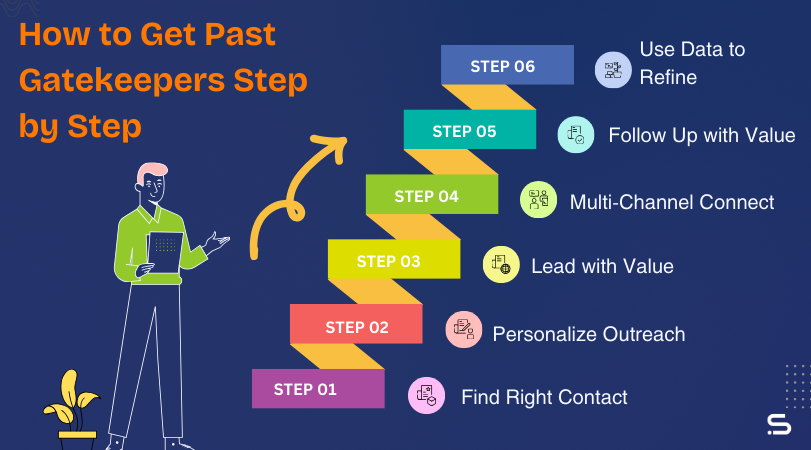
Step 1: Find the Right Contact
Before you reach out, make sure you’re targeting someone who can actually take action. Use tools and a bit of research to avoid wasting time on the wrong person.
Here’s how to do it effectively:
• Use LinkedIn to search by title and department
• Look for roles like Director, VP, or Head of [Function]
• Use Apollo, Lusha, or ZoomInfo to get direct contact details
• Confirm their relevance by checking recent activity or team info
When your outreach goes to someone with actual authority, everything that follows becomes more productive. Contact the wrong person and even a great message stalls, because they have no reason to forward it and no authority to act on it themselves. Getting the target right upfront saves you several rounds of follow-up that would otherwise go nowhere.
Step 2: Add Real Personalization
People respond to what feels relevant. A personalized message doesn’t just include a name, it references something that matters to the recipient.
It could be a recent post they shared, a company announcement, or an article they were quoted in. That first personalized sentence builds trust and makes your message worth reading.
Step 3: Lead with Value
Start by focusing on what they care about, not what you’re selling. Share an idea, question, or quick insight that connects with their goals. Instead of saying “Can I book 15 minutes?” try something like “I noticed your team is expanding.
Here’s one thing that might make that easier.” Opening with value builds interest and sets you apart from typical outreach.
Step 4: Use Multiple Channels to Connect
Relying on one communication channel limits your visibility. A multi-channel approach builds familiarity and increases response rates.
Try this approach:
• Connect on LinkedIn and engage with their content
• Send a personalized email based on their role or activity
• Use video tools like Vidyard to add a face to your message
• If appropriate, follow up with a voice message or call
The more natural touchpoints you create, the more likely your message is seen and taken seriously.
Step 5: Follow Up With Value Each Time
A good follow-up gives someone a new reason to engage, not just a reminder that you exist. Avoid repeating the same message. Instead, bring something new with each follow-up, such as a relevant article, an industry trend, or a quick win from a similar company.
Spaced-out, thoughtful follow-ups keep you top of mind without being intrusive. People are busy. The right follow-up helps them see your message when the timing is right.
Step 6: Use Data to Refine Your Outreach
Track everything so you can improve with every campaign. Use tools like HubSpot, Mailshake, or Close CRM to monitor open rates, response rates, and follow-up performance.
Pay attention to what works, subject lines, timing, message structure, and use that insight to adjust your outreach. Over time, you build a repeatable system that brings better results with less guesswork.
Alternatives to Gatekeeper
Gatekeeper is a commonly used term, but it can sound harsh, confrontational, or repetitive, especially in professional writing or outreach content.
The right alternative can help you communicate more clearly, show respect for the person or system you’re addressing, and keep your content engaging.
Pairing your words with clean visuals, edited by a free AI photo editor, can further sharpen your content.
Here are six alternatives to gatekeeper, along with when to use each one. Which term fits best usually depends on whether you’re describing a person, a process, or a piece of software, and on how much you want to soften the framing for a professional audience.
Point of Contact
Point of contact is a professional, neutral term for the person you initially reach out to within an organization. This could be someone who manages the inbox, directs phone calls, or coordinates first responses to inquiries. Using this term avoids conflict and keeps the tone collaborative.
It’s especially useful when you don’t want to imply that the person is blocking you, but rather managing communications as part of their role. In sales, hiring, or partnership conversations, referring to someone as the point of contact shows respect for their position without downplaying your intent to move forward.
Access Barrier
Access barrier is a functional term that focuses on the process rather than the person. It works well when you’re talking about systems, structures, or roles that slow or control access to decision-makers. This could include organizational hierarchy, security protocols, scheduling layers, or even geographic time zones.
It’s a good choice when writing analytically about business processes, or when identifying the friction points in sales and outreach efforts. It also fits well in SaaS and operational content where efficiency, speed, and automation are the focus.
Message Filter
Message filter fits discussions of how communications are screened before reaching their final destination. This could be an assistant reviewing emails, a spam filter using AI, or even a platform like LinkedIn deciding what shows up in someone’s inbox. The term describes the role clearly: someone or something is deciding what passes through.
This term is particularly useful in content that discusses digital marketing tools, automation, or modern outreach challenges. It also helps frame your message strategy around making sure your communication feels valuable and relevant enough to make it through the filter.
Screening Contact
Screening contact is a respectful, direct phrase for someone who reviews and assesses messages before forwarding them on. It keeps the human element intact and acknowledges that this person has a task, not a grudge.
This term is useful when writing about sales processes, especially in B2B, recruiting, or corporate sales contexts. It shows you understand the structure of professional organizations and that you’re working with the process, not trying to sneak around it. It positions the contact as part of the system, not an obstacle.
Front-Line Contact
Front-line contact refers to the first person you interact with in a communication flow. This could be a receptionist, customer support rep, junior executive, or virtual assistant. The term is neutral and approachable, often used in customer service or operational content.
It’s especially effective when writing about relationship-building strategies, since it reminds readers that every touchpoint matters, even the ones that aren’t with the final decision-maker. Referring to someone as a front-line contact signals professionalism and shows you understand the structure of client or partner communication.
Communication Gate
Communication gate is a softer alternative to gatekeeper that still acknowledges a controlled access point. It works well in both human and automated contexts.
For example, an assistant managing a calendar or an email spam filter can both be described as a communication gate.
This term focuses on the system rather than blaming the individual. It’s a good fit for SaaS or marketing content where you’re explaining how to optimize outreach, improve deliverability, or structure messaging for better access. It frames the goal as opening the gate, not breaking it down.
Top Software for Navigating Gatekeepers
Reaching decision-makers often comes down to how you manage the gatekeepers along the way. Whether that gatekeeper is a person, a system, or a process, the right software helps you break through more consistently.
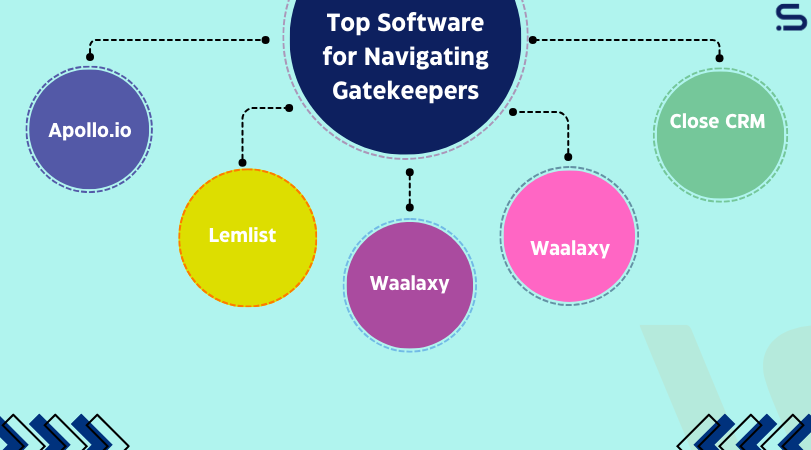
These tools help you find the right contacts, craft relevant outreach, and make sure your messages actually land where they need to. Instead of getting stuck in generic inboxes or lost in filters, you gain direct visibility and control over your outreach.
Below is a rundown of software worth considering for reaching the people who matter most. None of these tools replace a well-researched, personalized message on their own, but they remove the manual work of finding contacts and tracking what happens after you hit send, which is where most outreach efforts quietly fall apart.
| Tool | Main Use | Starting Price | Best For | Key Feature |
|---|---|---|---|---|
| Apollo.io | Lead discovery and outreach sequences | Free to $99/month | Sales teams, recruiters | Verified emails and contact enrichment |
| Lemlist | Personalized cold email campaigns | $39/month | SDRs, agencies, consultants | Dynamic image and video personalization |
| Waalaxy | LinkedIn automation and lead engagement | Free to $80/month | Freelancers, small teams | Multi-step messaging on LinkedIn |
| Vidyard | Video messages for email and LinkedIn | Free to $19/month | Outbound reps, founders | One-to-one video recording and tracking |
| Close CRM | CRM with calling and email integration | $99/month | Sales teams managing pipelines | Combined outreach, tracking, and CRM |
Pricing shown is approximate; check vendor websites for current rates.
Final Success Tips to Reach Decision-Makers
The strategies and tools covered so far can open doors, but consistent success depends on how well you apply them.
How you think about outreach, how you build relationships, and how you adapt matter as much as what you actually send. These final tips bring the pieces together so you can communicate with confidence and clarity.
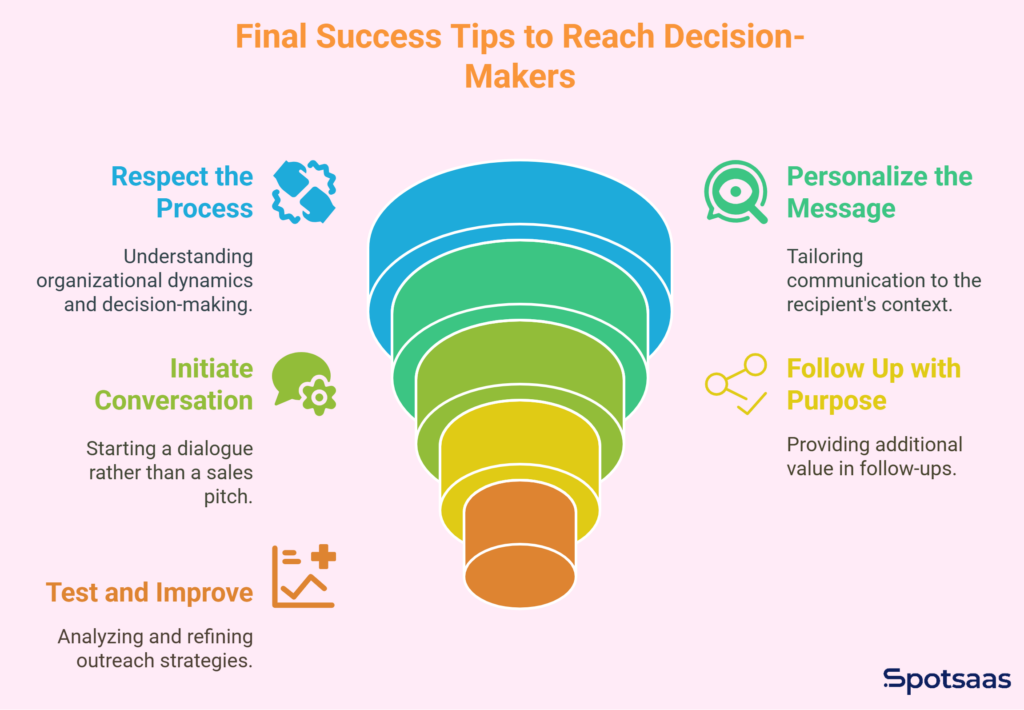
Respect the Process Without Rushing It
Gatekeepers and internal processes exist to protect time and focus. Trying to skip steps or use tricks can damage your credibility. Instead, take the time to understand how the organization operates.
Ask yourself what the right contact would need to see before engaging. Align your outreach with how they make decisions and when they make time for external messages. Respect earns attention, and people notice when you approach them with professionalism and patience.
Personalization Is Always Worth the Extra Minute
Generic messages get skimmed or ignored. Personalization tells the recipient you’ve made an effort. It signals that your message is relevant, timely, and thoughtful.
This doesn’t mean rewriting every email from scratch, but it does mean including something specific to the person you’re contacting. Mention a recent event, project, or quote.
Reference something meaningful from their website or social presence. Even one sentence of personalization can double your chances of a reply. It turns your message into something human, rather than one of a thousand identical sends.
Use Outreach as a Conversation Starter
Many outreach messages fail because they push too much, too soon. Your first contact shouldn’t feel like a pitch or a request for time. It should read like an introduction, or an opening line to a useful exchange.
Offer something small but valuable. Ask a question that sparks curiosity. Make it clear that your message is the start of a conversation, not a one-sided sales attempt. Decision-makers are more willing to respond when there’s no pressure attached to the first reply.
Follow Up with Purpose
No response doesn’t mean no interest. Most people are busy, and messages slip through. That’s why a follow-up should never read like a reminder, it should add something new.
Each follow-up is another chance to provide value. Share a relevant article, a brief case study, a new insight, or even a revised version of your original idea. Keep it short, focused, and respectful of their time. Done well, follow-up messages show consistency, not desperation.
Keep Testing and Improving
Outreach success comes from learning what works and refining your approach over time, effort by itself isn’t enough. Use outreach tools and CRM platforms to track open rates, response times, and conversion steps.
Look at which subject lines get attention and which messages lead to replies. Small changes in tone, timing, or formatting can have a major impact. The more you analyze your results, the more confident you become in what works. Growth here comes from feedback and iteration, not from sending more of the same. Even a simple habit, like reviewing your last ten sends every couple of weeks, will surface patterns that a single campaign report won’t show you.
Conclusion
Getting past gatekeepers comes down to reaching the right people with purpose, using smart tools, and leading with value, not tricks. Whether you’re in sales, recruiting, or partnerships, strategy matters more than volume.
With the right approach, personalized outreach, and consistent follow-up, you won’t just get through gatekeepers, you’ll get noticed by decision-makers. The next move is yours.
Start with one message, track what works, and improve with every send. Real results come from thoughtful action, not guesswork.
FAQs
What is a gatekeeper in sales or outreach?
A gatekeeper is anyone or anything that controls access to a decision-maker. This can be a human, such as an executive assistant, or a digital system like an email filter or ATS.
How can I get past gatekeepers without sounding pushy?
Use personalization, lead with value, and speak clearly to their role. Show respect, avoid pressure, and focus on starting a conversation, not making a hard pitch.
What tools help with reaching decision-makers directly?
Tools like Apollo.io, Lemlist, Waalaxy, Vidyard, and Close CRM help you find contacts, send personalized outreach, track performance, and manage follow-ups effectively.
How many follow-ups should I send?
Most effective outreach includes 3 to 5 follow-ups. Each should add value or a new angle, not just repeat your original message. Timing and content matter more than frequency.
Can I bypass gatekeepers completely?
In many cases, yes. With the right research, tools, and messaging, you can often connect directly with decision-makers via email, LinkedIn, or referrals, but it has to be relevant and respectful.
