
EOR software lets businesses hire talent globally without setting up local entities. It handles onboarding, payroll, compliance, and contracts in one platform. Its full value shows once you connect it to the systems you already use for payroll, HR, and accounting. A connected setup keeps data flowing between tools, cuts manual entry, and supports accurate compliance.
Teams can focus on operations while the software handles employee records, tax details, and reporting. For growing companies, this integration helps maintain efficiency, improve accuracy, and keep a consistent workflow across departments.
Why You’ll Learn About Integrating EOR with Core Business Systems
This guide covers how integrating Employer of Record (EOR) software with your existing payroll, HRIS, and accounting systems can improve global workforce management. Here is what you will find:
- How EOR software simplifies global hiring, payroll, and compliance management.
- Why integrating EOR software with existing systems improves efficiency and accuracy.
- Common integration scenarios with payroll, HRIS, and accounting tools.
- Key features to look for when selecting an EOR platform with integration capabilities.
- A breakdown of integration methods like native integrations, APIs, and middleware tools.
- A step-by-step guide for integrating EOR software into your business operations.
By the end, you will have the knowledge to make informed decisions when selecting and integrating EOR software to support global expansion and manage your workforce.
Why Integrating EOR Software with Payroll and HR Systems Is Essential
Choosing an Employer of Record software is not only about simplifying global hiring. It also depends on how well the software fits your current workflow. Many businesses already rely on payroll providers, HR systems, and accounting tools to run internal operations.
| Integration Flow | Purpose | Example |
|---|---|---|
| EOR ↔ Payroll | Sync salary, tax, and deduction data for smooth payroll processing | Deel integrates with ADP to automate global payroll runs |
| EOR ↔ HRIS | Share employee profiles, onboarding status, and time-off data | Remote connects with BambooHR to simplify employee records |
| EOR ↔ Accounting | Auto-sync invoices, cost centers, and reimbursements | Rippling exports payroll and contractor invoices to QuickBooks |
If your EOR software does not connect with these platforms, you are likely to face duplicate work, scattered data, and unnecessary delays.
How Connected Systems Cut Repetitive Work
When systems share data, your teams no longer enter the same information in several places. Once an employee is onboarded in the EOR platform, their details can sync automatically with your payroll and HR systems.
This saves time on data entry, and it lets your team focus on higher-value work instead of repetitive admin tasks that add little to the business.
Ensuring Data Accuracy with EOR System Integration
Even small errors in employee data, such as bank details, tax information, or job titles, can create bigger problems later.
With integration in place, an update made in one system shows up in the others without anyone re-typing it. This reduces the chance of mismatches and keeps payroll, reporting, and employee records aligned across every tool.
Improve Global Compliance Through Connected EOR Tools
Employment laws vary by region and often require detailed record-keeping. Integrating EOR tools with accounting and HR software captures compliance data accurately, whether it is local tax rates, social contributions, or contract terms.
A shared data model supports audit readiness and timely reporting, so your teams do not have to gather the same records by hand each time a regulator or auditor asks for them.
Building a Connected Workflow with EOR and Internal Tools
A fully integrated setup removes silos. HR can manage onboarding, payroll can process salaries, and finance can track labor costs, all from one source of truth.
This improves communication between departments and keeps work moving, even across global hiring.
Smarter Workforce Planning with Real-Time EOR Data
Integration brings real-time visibility into workforce data. Leaders can review salary trends, contractor expenses, and tax liabilities in one place, which helps them make informed decisions.
Whether you are planning a new market entry or reviewing budget forecasts, up-to-date data across systems is a clear advantage.
Scale Global Hiring Without Operational Overload
As your hiring footprint grows, managing global operations becomes more complex. A well-integrated EOR setup lets your systems scale with your team.
You will not need to rebuild workflows from scratch or rely on manual fixes each time you enter a new country. Everything is already connected and ready to support expansion as headcount grows.
Must-Have Integration Features in EOR Software
Choosing an EOR platform is not only about handling compliance and payroll abroad. It also depends on how easily the platform fits your current operations. For businesses that want to scale efficiently, these integration-friendly features are worth prioritizing.
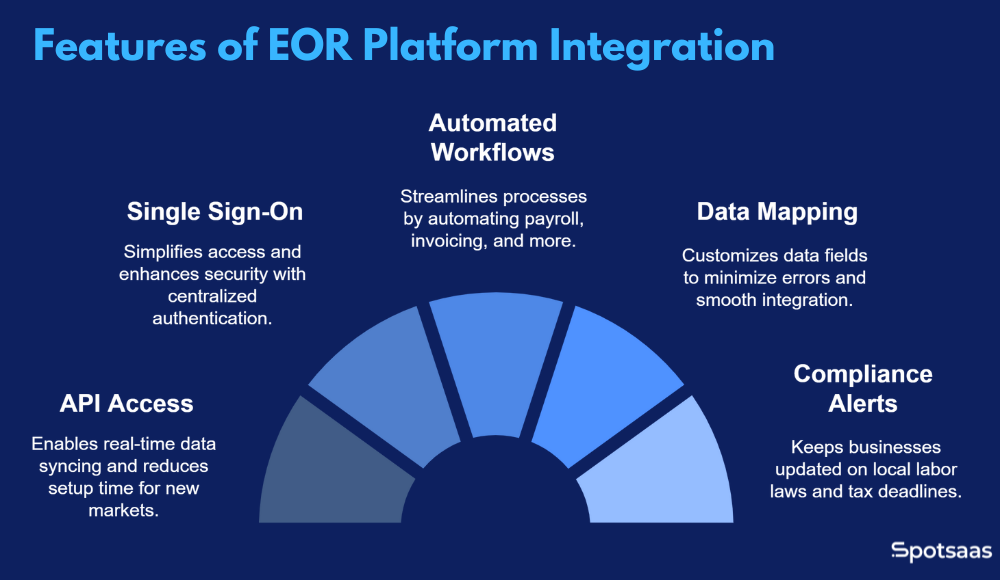
API Access and Pre-Built Integrations
Look for EOR software that offers open API access or ready-made integrations with platforms like ADP, Gusto, BambooHR, or QuickBooks. This lets your systems connect without custom development.
APIs allow real-time data syncing of employee data, payroll, and billing. Pre-built connectors reduce setup time and make it easier to launch new markets quickly.
Single Sign-On (SSO)
SSO simplifies access by letting team members log in with their existing company credentials. It improves security, reduces the IT support workload, and makes the tools easier to use.
With centralized authentication, HR and finance teams can move between tools more efficiently, without juggling a separate password for each one, especially when they manage multiple systems every day.
Automated Workflows
Integrated EOR tools can trigger automated actions such as payroll runs, invoice generation, or tax form submissions. These workflows save time and reduce dependency on manual steps.
For example, adding a new hire can automatically start background checks, benefits setup, and payment processing, so the process stays on track without constant follow-ups.
Data Mapping and Field Customization
Custom field mapping helps match the structure of your internal systems with the EOR platform. This minimizes errors when syncing employee profiles or payroll data.
It also lets businesses keep their own data formats, which makes integration smoother and cuts the time spent reconciling mismatched records.
Compliance Alerts and Localization Support
EOR software should offer alerts for local labor laws, tax deadlines, and benefits regulations. This helps keep your records up to date and reduces compliance risks.
Some tools also sync local policy changes directly into your accounting or HR systems, so teams can act on new rules on time without someone tracking every regulation by hand.
3 EOR Integration Methods Explained: Native, API, Middleware
EOR software can connect with other business systems in several ways. The method you choose depends on your internal tech stack, available resources, and how flexible or ready-made you want the integration to be.
| Method | Description | Best For | Example |
|---|---|---|---|
| Native Integrations | Pre-built, plug-and-play integrations maintained by the EOR vendor. | Companies seeking quick setup and minimal customization. | Rippling integrates with QuickBooks for payroll and expense syncing. |
| API-Based Integrations | Custom connections built via API for specific business needs. | Businesses with in-house tech teams and custom workflows. | Remote’s API syncs employee data with internal HR systems. |
| Middleware Tools | Third-party tools that automate data transfer between systems. | Companies needing flexible integrations without coding. | Zapier triggers invoice creation in Xero after payroll completes. |
Here is a breakdown of the three most common approaches used by EOR platforms to connect with payroll, HRIS, and accounting tools.
What Are Native Integrations in EOR Platforms?
Native integrations are the simplest option for most businesses. These are pre-built, plug-and-play connections created by the EOR vendor to work directly with popular platforms like QuickBooks, Gusto, Xero, or BambooHR. Because the vendor builds and maintains them, they usually come with full support and automatic updates.
This approach suits companies that want quick setup with minimal technical input. For example, Rippling offers out-of-the-box integrations with a range of HR and finance tools, so businesses can sync payroll data or employee records in a few clicks.
Using APIs for Custom EOR Software Integration
APIs (Application Programming Interfaces) give businesses more flexibility to build custom integrations between their EOR software and other systems. With API access, your development team can build workflows for specific needs, whether that is syncing employee data with a proprietary HR platform or creating region-specific payroll automations.
While API-based integration takes more time to implement, it is a strong choice for organizations that have unique internal processes or need tight control over how data flows between platforms. A well-documented API can support real-time updates, two-way syncing, and scalable data management across global teams.
Automating EOR Integration with Middleware Tools
Middleware solutions like Zapier, Workato, Tray.io, or custom-built connectors act as the bridge between your EOR software and other business tools. These platforms allow “no-code” or “low-code” automation, where users create workflows that move data from one platform to another based on predefined rules.
Middleware is a good choice if your EOR vendor does not offer native integrations but still supports API access. For example, you could use Zapier to trigger an invoice in your accounting system when a payroll batch is completed in your EOR platform. It may require initial configuration, but middleware gives teams the ability to build useful integrations without full development resources.
Step-by-Step Guide: Integrating EOR Software with Business Systems
Integrating an EOR platform with payroll, HRIS, and accounting systems requires careful planning. Follow this structured approach for a smooth, efficient integration.
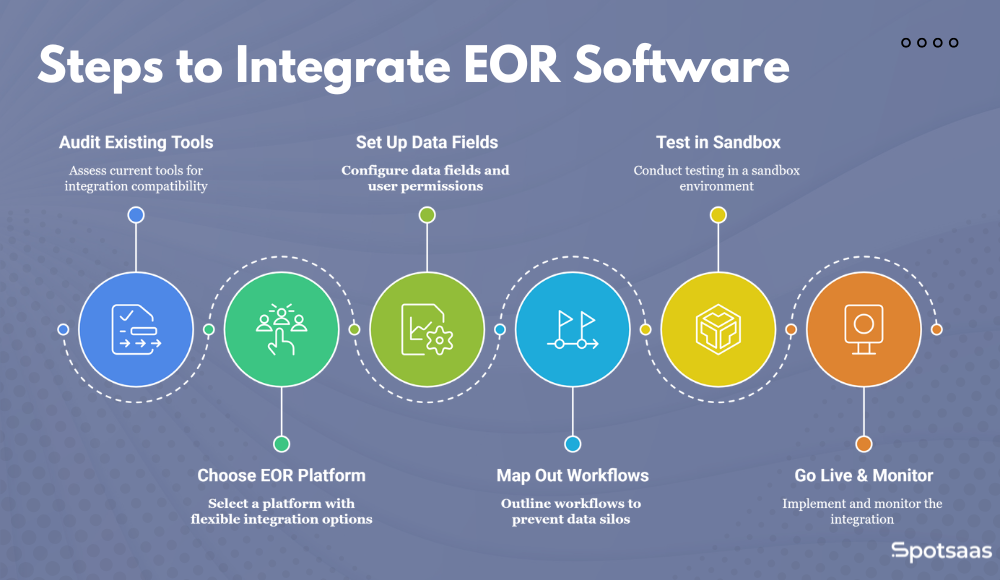
Audit Existing Tools
Start by assessing your current tools (payroll, HRIS, and accounting systems) to check integration compatibility. This step helps you spot any gaps or upgrades needed before you proceed.
Choose an EOR Platform with Flexible Integration Options
Select an EOR platform that supports native integrations, APIs, or middleware tools. Make sure it aligns with your current systems and can scale with future needs.
Set Up Data Fields & User Permissions
Configure data fields for accurate synchronization across platforms. Define user roles and permissions to maintain data security and proper access.
Map Out Workflows
Outline the workflows that connect your systems with the EOR software, and note where data moves from one tool to the next. This prevents data silos, miscommunication between teams, and unnecessary duplication of tasks.
Test in a Sandbox Environment
Test the integration in a sandbox environment to confirm data flows correctly and to catch any issues before going live. Fix any problems during testing to avoid complications.
Go Live & Monitor
Once tested, roll out the integration across your workforce. Monitor the system closely for accuracy and performance, and make adjustments as needed to keep it effective over the long term.
Common EOR Integration Challenges and How to Fix Them
Integrating EOR software with your payroll, HR, and accounting systems can simplify operations, but businesses often run into a few common challenges along the way.
| Challenge | Description | How to Avoid It |
|---|---|---|
| Data Mismatches | Errors due to inconsistent data across systems. | Map data fields correctly and use validation rules. |
| Compatibility Issues | Systems not working well together. | Check compatibility before choosing an EOR; use APIs or middleware. |
| Complex Workflows | Manual interventions and inefficiencies in processes. | Design simple workflows and test them thoroughly. |
| Security Concerns | Risks of data breaches and non-compliance. | Choose compliant EOR platforms with encryption and access controls. |
| Lack of Training | Improper usage leading to errors and inefficiency. | Provide comprehensive training and clear change management. |
| Post-Integration Monitoring | Unnoticed issues after going live. | Set up monitoring with alerts and review performance regularly. |
Knowing these challenges in advance lets you take steps to avoid them and keep the integration on track.
Data Mismatches and Inaccuracies
One of the most common challenges businesses face during integration is data mismatches. This happens when employee information, payroll details, or tax data do not align across platforms, which can lead to errors in payment, compliance, and reporting.
How to Avoid It:
Map data fields accurately, keep naming conventions and formats consistent, and use automated validation rules to check for discrepancies. Run regular audits and monitor data flow.
Compatibility Issues Between Systems
Not all software systems are built to work together, which can cause compatibility issues when you link your EOR platform with existing tools. This is especially a problem with older or less common software.
How to Avoid It:
Run a compatibility check before choosing an EOR platform. Confirm it supports your existing tools through native integrations, APIs, or middleware. If needed, use custom development or integration platforms.
Complex Workflows and Manual Interventions
In some cases, integration leads to overcomplicated workflows that need frequent manual intervention. This usually happens when systems do not fully align, which causes inefficiencies and delays in tasks like payroll processing or reporting.
How to Avoid It:
Design simple workflows and automate as much as possible. Test in a sandbox environment to find bottlenecks and cut manual steps, with clear documentation for teams.
Security and Data Privacy Concerns
When integrating multiple systems, especially across borders, businesses often face data security and privacy concerns. Handling sensitive employee information requires strict controls and compliance with global data protection laws such as GDPR or CCPA.
How to Avoid It:
Choose a compliant EOR platform with encrypted data. Run security audits, confirm partners follow best practices, limit data access to authorized users, and implement multi-factor authentication (MFA).
Insufficient Training and Change Management
New software and integrations can disrupt daily operations if teams are not properly trained. Without enough training, employees may struggle to adapt to new systems, which leads to frustration, mistakes, and lower productivity.
How to Avoid It:
Provide thorough training for HR, payroll, finance, and IT teams. Offer ongoing support and set clear change management procedures for smooth adoption.
Failure to Monitor Post-Integration
Even after a successful integration, some businesses fail to monitor it over time. Problems can arise as workflows change or data volume grows, but without monitoring, these issues go unnoticed until they become significant.
How to Avoid It:
Set up continuous monitoring, use automated alerts and dashboards, and review KPIs regularly to confirm systems perform as expected, making adjustments when needed.
Top Business Benefits of EOR Software Integration
Integrating EOR software with your existing systems offers many operational, financial, and strategic advantages. Below are the key benefits businesses can expect after a successful integration.
| Benefit | Description |
|---|---|
| Greater Efficiency | Automates processes, reducing manual data entry and errors. |
| Improved Accuracy | Ensures synced data across systems, minimizing errors. |
| Better Compliance Management | Keeps the company compliant with local laws and regulations. |
| Simpler Financial Reporting | Helps finance teams simplify budgeting and reporting. |
| Scalable Global Operations | Supports international growth through automated operations. |
| Real-Time Data Insights | Provides up-to-date data for informed decision-making. |
| Improved Employee Experience | Improves satisfaction with faster onboarding and accurate payroll. |
Automate Workflows and Improve Efficiency with EOR Tools
With systems working together, manual data entry drops and the administrative workload shrinks. Employees no longer enter the same data in multiple systems, and payroll, onboarding, and benefits processes become automated.
The result is time saved on admin, fewer errors from double entry, and faster decisions, which lets teams focus on higher-value work, not routine paperwork.
Ensure Payroll & HR Data Accuracy with EOR Integration
Consistent data across all platforms keeps employee information, payroll details, and financial records aligned and accurate, so teams are not working from conflicting versions of the same record.
Automated workflows and data synchronization remove human error, so payroll, benefits, and compliance data stay up to date and correct.
Strengthen Global Compliance Through EOR Connections
Global compliance is complex, with each region having its own tax and labor laws. Integrated EOR software keeps payroll taxes, benefits, and employment contracts correctly managed across regions.
Real-time updates on regulatory changes help your company stay compliant as laws shift, and they reduce the risk of costly fines or failed audits in the regions where you hire.
Simplify Financial Reporting with Integrated EOR Systems
Integrating EOR software with accounting systems gives you visibility into labor costs, contractor expenses, and overall financial performance — see our EOR pricing guide for typical cost ranges. This transparency makes budgeting, reporting, and forecasting easier.
Finance teams can track and reconcile payroll expenses, benefits costs, and tax obligations in one place, which supports more accurate budgets and financial planning across regions.
How EOR Integration Supports Scalable Global Hiring
As your business expands internationally, connecting your EOR platform with HR, payroll, and accounting tools lets you scale more easily. With automated systems in place, managing employees and contractors across borders becomes more straightforward and efficient.
You can onboard new employees, process payments on time, and stay compliant in multiple countries at once, all without adding complexity to your day-to-day operations.
Use Real-Time EOR Data for Smarter Business Decisions
Integration provides real-time access to key data, which helps management make better-informed decisions. With an up-to-date view of payroll, benefits, and compliance across regions, leaders can address potential issues early and make data-driven choices that benefit the bottom line.
Improved Employee Onboarding & Payroll Experience with EOR
With automated workflows, employees get faster onboarding, timely payroll processing, and accurate benefits management. HR can also spend more time improving the employee experience instead of managing repetitive tasks.
A smooth integration gives employees a better, more efficient experience, which helps improve retention and satisfaction.
Final Thoughts: Why EOR System Integration Is a Must in 2026
Integrating EOR software with your existing HR, payroll, and accounting systems is essential for simpler operations, better accuracy, and reliable compliance. With an EOR platform that has strong integration capabilities, businesses can automate workflows, reduce manual tasks, and keep data accurate in real time.
Whether through native integrations, APIs, or middleware tools, well-built connections across platforms support scalable global operations and better decisions. By weighing the integration methods, features, and solutions available, companies can improve global workforce management and focus on growth instead of heavy administrative work.
EOR Software Integration: FAQs Answered
How does EOR software integrate with existing systems?
EOR software integrates with payroll, HRIS, and accounting systems through APIs, native integrations, or middleware tools like Zapier.
What are the key benefits of EOR software integration?
Integration simplifies workflows, reduces manual errors, keeps data accurate, and eases compliance and financial reporting.
Can EOR software help with global compliance?
Yes. EOR software supports compliance with local labor laws, tax regulations, and benefits management across multiple countries.
Is training necessary for EOR software integration?
Yes. Proper training helps teams use the new integrated system effectively and efficiently.
